
Interior light control switch
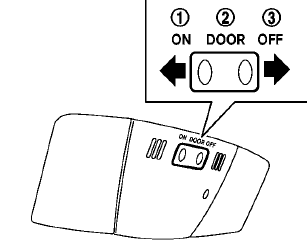
The interior light control switch has three positions: ON, DOOR and OFF.
ON position
When the switch is in the ON position 1 the map lights and rear personal lights will illuminate.
DOOR position
When the switch is in the DOOR position 2 , the map lights and rear personal lights will illuminate under the following conditions:
• ignition switch is switched to the LOCK position
— remain on for about 15 seconds.
• doors are unlocked by pushing the UNLOCK button on the Intelligent Key or door handle request switch with the ignition switch in the LOCK position
— remain on for about 15 seconds.
• any door is opened and then closed with the ignition switch in the LOCK position
— remain on for about 15 seconds.
• any door is opened with the ignition switch in the ACC or ON position
— remain on while the door is opened.
When the door is closed, the lights go off.
The lights will also turn off after a period of time when the lights remain illuminated after the ignition switch has been pushed to the OFF or LOCK position to prevent the battery from becoming discharged.
Models with color display:
When the auto interior illumination is set to the OFF position (see “Vehicle information and settings” in the “4. Monitor, heater, air conditioner, audio, phone and voice recognition systems” section), the lights will illuminate under the following condition:
• any door is opened with the ignition switch in any position
— remain on while the door is opened.
When the door is closed, the lights go off.
OFF position
When the switch is in the OFF position3 , the lights will not illuminate, regardless of the condition.
CAUTION
Do not use for extended periods of time with the engine stopped. This could result in a discharged battery.
See also:
Precautions when starting and driving
WARNING
● Do not leave children or adults who
would normally require the assistance
of others alone in your vehicle. Pets
should also not be left alone. They
could accidentally injure thems ...
Increasing fuel economy
GUID-08316153-E8EB-4B1D-A83C-780DAE9E7643 - Accelerate slowly and smoothly. Maintain
cruising speeds with a constant accelerator position.
- Drive at moderate speeds on the highway.
Driving at hig ...
Basic information
WARNING
Radio waves may interfere with certain electronic medical devices. Anyone who uses a pacemaker or another
implanted medical device should contact the device manufacturer before usin ...