
Intelligent Key system
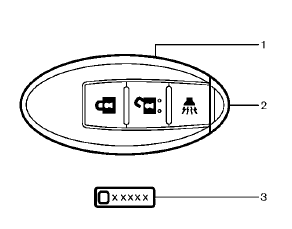
Type A
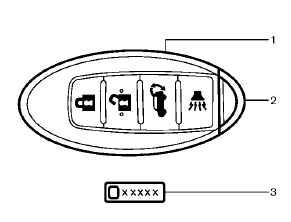
Type B
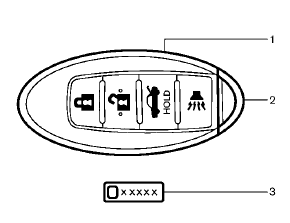
Type C
1. Intelligent Key (2)
2. Mechanical key (inside the key) (2)
3. Key number plate (1)
Your vehicle can only be driven with the Intelligent Keys which are registered to your vehicle’s Intelligent Key system components and NISSAN Vehicle Immobilizer System components.
As many as 4 Intelligent Keys can be registered and used with one vehicle. The new keys must be registered by a NISSAN dealer prior to use with the Intelligent Key system and NISSAN Vehicle Immobilizer System of your vehicle. Since the registration process requires erasing all memory in the Intelligent Key components when registering new keys, be sure to take all Intelligent Keys that you have to the NISSAN dealer.
CAUTION
• Be sure to carry the Intelligent Key with you when driving. The Intelligent Key is a precision device with a built-in transmitter. To avoid damaging it, please note the following.
— The Intelligent Key is water
resistant; however, wetting may
damage the Intelligent Key. If
the Intelligent Key gets wet,
immediately wipe until it is completely
dry.
— Do not bend, drop or strike it
against another object.
— If the outside temperature is
below 148F (−108C), the battery
of the Intelligent Key may not
function properly.
— Do not place the Intelligent Key
for an extended period in a
place where temperatures exceed
1408F (608C).
— Do not change or modify the
Intelligent Key.
— Do not use a magnet key holder.
— Do not place the Intelligent Key
near an electric appliance such
as a television set, personal
computer or cellular phone.
— Do not allow the Intelligent Key
to come into contact with water
or salt water, and do not wash it
in a washing machine. This
could affect the system function.
• If an Intelligent Key is lost or stolen, NISSAN recommends erasing the ID code of that Intelligent Key. This will prevent the Intelligent Key from unauthorized use to unlock the vehicle. For information regarding the erasing procedure, please contact a NISSAN dealer.
See also:
Engine cooling system
The engine cooling system is filled at the factory
with a pre-diluted mixture of 50% Genuine
NISSAN Long Life Antifreeze/Coolant (blue) and
50% water to provide year-round anti-freeze and
coolant ...
Emission control system warranty
Your NISSAN vehicle is covered by the following
emission warranties:
For USA
1. Emission Defects Warranty
2. Emissions Performance Warranty
Details of this warranty may be found with other
vehic ...
Seats, seat belts and Supplemental Restraint System (SRS)
Seats, seat belts and Supplemental Restraint System (SRS)
1. Supplemental front-impact air bags
2. Front seat-mounted side-impact supplemental air bags
3. Seat belts
4. Head restraints
— Fron ...