
Locking with inside lock knob
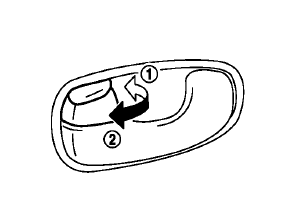
To lock the door individually, move the inside lock knob to the lock position1 then close the door.
To unlock, move the inside lock knob to the unlock position2 .
When locking the door without Intelligent Key, be sure not to leave the Intelligent Key inside the vehicle.
See also:
Emergency engine shut off
To shut off the engine in an emergency situation
while driving, perform the following procedure:
• Rapidly push the push-button ignition
switch
3 consecutive times in less than 1.5
seconds, or ...
Vehicle load capacity
Do not exceed the load limit of your vehicle
shown as “The combined weight of occupants
and cargo” on the Tire and Loading
Information label. Do not exceed the
number of occupants shown as “ ...
Precautions on child restraints
WARNING
•
CrossCabriolet models are not
equipped with top tethers. A child
restraint system requiring a top
tether strap cannot be properly installed
and should not be used in
your vehic ...