
Locking with power door lock switch
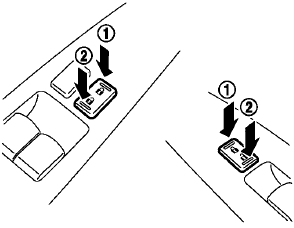
Operating the power door lock switch will lock or unlock all the doors. The switches are located on the driver’s and front passenger’s door armrests.
To lock the doors, push the power door lock switch to the lock position 1 with the driver’s or front passenger’s door open, then close the door.
When locking the door this way, be certain not to leave the Intelligent Key inside the vehicle.
unlock the doors, push the power door lock switch to the unlock position2 .
Lockout protection
When the power door lock switch (driver or front passenger) is moved to the lock position with the Intelligent Key in the port and any door open, all doors will lock and unlock automatically. With the Intelligent Key left in the vehicle (not in the Intelligent Key port) and any door open, all doors will unlock automatically and a chime will sound after the door is closed.
These functions help to prevent the Intelligent Key from being accidentally locked inside the vehicle.
See also:
FM/AM radio with compact disc (CD) changer (if so equipped)
For all operation precautions, see Audio operation
precautions in this section.
Audio main operation
VOL/ON·OFF control:
Place the ignition switch in the ACC or ON
position and push the VOL/ON· ...
Brake precautions
Vacuum assisted brakes
The brake booster aids braking by using engine
vacuum. If the engine stops, you can stop the
vehicle by depressing the brake pedal. However,
greater foot pressure on the bra ...
Battery
• Keep the battery surface clean
and dry.
Clean the battery with a solution of baking
soda and water.
• Make certain the terminal
connections are
clean and securely tightened.
• If th ...