
Compass (if so equipped)
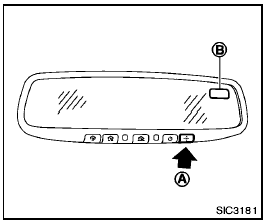
When the ignition switch is turned to the ON position, the compass display B will indicate the direction of the vehicle’s heading.
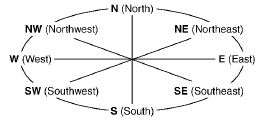
If the display reads “C”, calibrate the compass by driving the vehicle in 3 complete circles at less than 5 MPH (8 km/h). You can also calibrate the compass by driving your vehicle on your everyday route. The compass will be calibrated once it has tracked 3 complete circles.
To turn on and off the compass manually, push the
 switch A while the ignition
switch is in the ON position.
switch A while the ignition
switch is in the ON position.
Zone variation change procedure
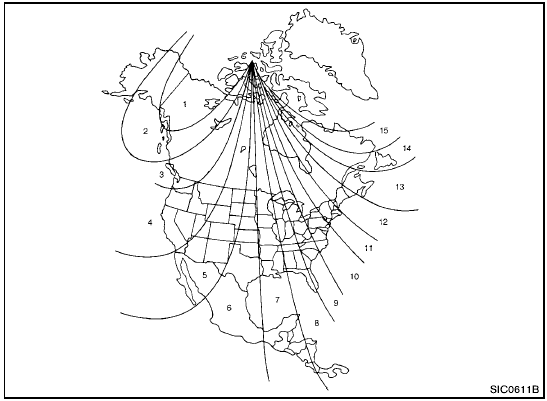
Zone map
The difference between magnetic north and geographical north is known as variance. In some areas, this difference can sometimes be great enough to cause false compass readings.
Follow these instructions to set the variance for your particular location if
this happens:
1. Push the switch for more than 3
seconds. The current zone number will appear in the display.
2. Find your current location and variance number on the zone map.
NOTE:
Use zone number 5 for Hawaii.
3. Push the switch repeatedly until
the new zone number appears in the display, then release the switch. After you release
the switch, the display will show a compass direction within a few seconds.
- If the compass deviates from the correct indication soon after repeated adjustment, have the compass checked at a NISSAN dealer.
- The compass may not indicate the correct compass point in tunnels or while driving up or down a steep hill. (The compass returns to the correct compass point when the vehicle moves to an area where the geomagnetism is stabilized.)

- Do not install a ski rack, antenna, etc., which are attached to the vehicle by means of a magnet. They affect the operation of the compass.
- When cleaning the mirror, use a paper towel or similar material dampened with glass cleaner. Do not spray glass cleaner directly on the mirror as it may cause the liquid cleaner to enter the mirror housing.
See also:
Exterior rear
Exterior rear
1. Lift gate
— Intelligent Key system*
2. Rear view camera*
3. Rear window wiper and washer
— Switch operation
— Window washer fluid
4. Rear window defroster
5. High-moun ...
OFF button
To change the display brightness, press
the OFF button. Pressing the button
again
will change the display to the day
or the
night display. The brightness can
then be
adjusted using the NI ...
Starting the engine
Basic Information
1. Apply the parking brake securely before attempting to start the engine. This helps keep the Nissan Murano
stationary throughout the starting procedure.
2. Place the shift p ...