
Blind Spot Warning (BSW)/Lane Departure Warning (LDW) systems (if so equipped)
The Blind Spot Warning (BSW) system helps alert the driver of other vehicles in adjacent lanes when changing lanes.
The Lane Departure Warning (LDW) system helps alert the driver when the vehicle is traveling close to either the left or the right of a traveling lane.
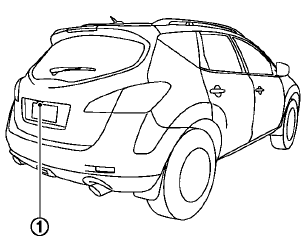
The BSW/LDW systems use the RearView Monitor camera unit1 with automatic washer and blower.
WARNING
• The BSW system is not a replacement for proper driving procedure and is not designed to prevent contact with vehicles or objects.
When changing lanes, always use
the side and rear mirrors and turn
and look in the direction you will
move to ensure it is safe to change
lanes. Never rely solely on the BSW system.
• The LDW system is only a warning
device to help inform the driver of a
potential unintended lane departure.
It will not steer the vehicle or
prevent loss of control. It is the
driver’s responsibility to stay alert,
drive safely, keep the vehicle in the
traveling lane, and be in control of
the vehicle at all times.
• The camera unit may not function
properly under the following conditions:
— When towing a trailer.
— When strong light enters the
camera unit. (for example, light
directly shines on the rear of the
vehicle at sunrise or sunset.)
— When ambient brightness
changes suddenly. (for example,
when the vehicle enters or exits
a tunnel or passes under a
bridge.)
• If the camera lens is excessively dirty, the automatic washer may not be able to completely clean the lens.
This could result in the camera not
detecting vehicles or lane markers.
• Excessive noise (for example, audio
system volume, open vehicle window)
will interfere with the chime
sound, and it may not be heard.
- BSW system operation
- BSW driving situations
- LDW system operation
- BSW/LDW temporary disabled status
- BSW/LDW automatic deactivation
- BSW/LDW malfunction
- Camera unit maintenance
See also:
Cleaning exterior
In order to maintain the appearance of your
vehicle, it is important to take proper care of it.
To protect the paint surface, wash your vehicle
as soon as you can:
• after a rainfall to preven ...
Wheels and tires
If you have a flat tire, see “Flat tire” in the
“In case of emergency” section of this
manual. ...
Read first—then drive safely
Before driving your vehicle, please read this
Owner’s Manual carefully. This will ensure familiarity
with controls and maintenance requirements,
assisting you in the safe operation of your
vehic ...