
Passenger compartment
CAUTION
Never use a fuse of a higher or lower amperage rating than that specified on the fuse box cover. This could damage the electrical system or cause a fire.
If any electrical equipment does not operate, check for an open fuse.
1. Be sure the ignition switch and the headlight
switch are turned off.
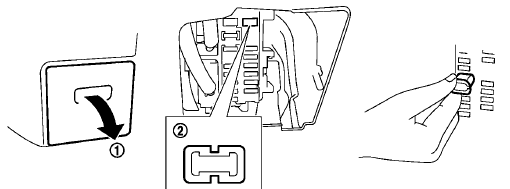
2. Pull to remove the fuse box cover 1 .
3. Remove the fuse with the fuse puller 2 .
4. If the fuse is open, replace it with a new fuse.
5. If a new fuse also opens, have the electrical
system checked and repaired by a NISSAN
dealer.
Example
Extended storage fuse switch
To reduce battery drain, the extended storage fuse switch comes from the factory switched off.
Prior to delivery of your vehicle, the switch is pushed in (switched on) and should always remain on.
If the extended storage fuse switch is not pushed in (switched on), the “SHIPPING MODE ON, PUSH STORAGE FUSE” warning may appear on the dot matrix liquid crystal display.
See “Dot matrix liquid crystal display” in the “2.
Instruments and controls” section.
If any electrical equipment does not operate, remove the extended storage fuse switch and check for an open fuse.
NOTE:
If the extended storage fuse switch malfunctions, or if the fuse is open, it is not necessary to replace the switch. In this case, remove the extended storage fuse switch and replace it with a new fuse of the same rating.
How to remove the extended storage fuse switch:
1. To remove the extended storage fuse switch,
be sure the ignition switch is in the OFF or
LOCK position.
2. Be sure the headlight switch is in the OFF
position.
3. Remove the fuse box cover.
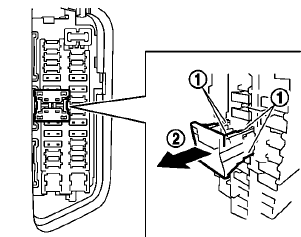
4. Pinch the locking tabs 1 found on each
side of the storage fuse switch.
5. Pull the storage fuse switch straight out from
the fuse box2 .
See also:
California perchlorate advisory
Some vehicle parts, such as lithium batteries, may contain perchlorate material.
The following advisory is provided: “Perchlorate Material - special handling
may apply, See www.dtsc.ca.gov/ hazar ...
Vehicle identification number (VIN) plate
The vehicle identification number (VIN) plate is
located as shown. This number is the identification
for your vehicle and is used in the vehicle
registration.
The vehicle identification number ...
Locking with power door lock switch
Operating the power door lock switch will lock
or unlock all the doors. The switches are located
on the driver’s and front passenger’s door
armrests.
To lock the doors, push the power door ...