
Vehicle identification number (chassis number)
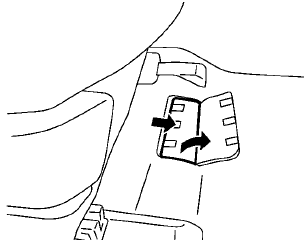
The vehicle identification number is located as shown.
Remove the cover to access the number.
See also:
How to adjust the screen
To adjust the Display ON/OFF, Brightness, Tint,
Color, Contrast and Black Level of the RearView
Monitor, press the SETTING button with the
RearView Monitor on and select the “Display”
key. Sel ...
NISSAN Voice Recognition Alternate Command Mode
The Alternate Command Mode enables control
of the audio and display systems as well as
additional commands for the Vehicle Information,
Phone and Navigation systems. With this setting
active, the ...
Foreword
Welcome to the growing family of new NISSAN owners. This vehicle is delivered
to you with confidence. It was produced using the latest techniques and strict quality
control.
This manual was prepa ...