
Exterior front
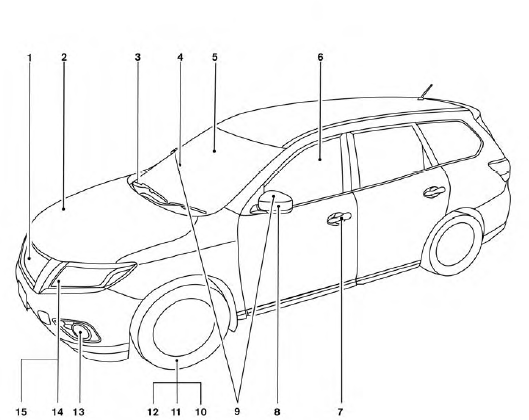
1. Front view camera (if so equipped)
2. Engine hood
3. Windshield wiper and washer switch,
wiper blades
4. Windshield-washer fluid
5. Compass display (if so equipped)
6. Power windows
7. Door locks, NISSAN Intelligent Key®,
Remote Engine Start (if so equipped),
keys
8. Mirrors
9. Side view camera (if so equipped)
10. Tire pressure monitoring system
(if so equipped)
11. Flat tire
12. Tire chains
13. Fog light switch (if so equipped)
14. Replacing bulbs
15. Headlight and turn signal switch
See the page number indicated in parentheses for operating details.
See also:
Child safety
Do not allow children to play with the seat belts. Most seating positions
are equipped with Automatic Locking Retractor (ALR) mode seat belts. If the seat
belt becomes wrapped around a child’s ...
Cargo light
The cargo light on the overhead trim has a threeposition
switch. To operate, push the switch to
the desired position.
1 ON: The light is illuminated.
2 DOOR: The light illuminates when the liftg ...
Magnetic Wireless charger
Basic Information
Indicator
Charging pad
The magnetic wireless charger in the Nissan Murano is located at the front of the center console, below the
climate control system. To begi ...