
Head restraints (2nd row)
WARNING
Head restraints supplement the other vehicle safety systems. They may provide additional protection against injury in certain rear end collisions. Adjust the head restraints properly, as specified in this section. Check the adjustment after someone else uses the seat. Do not attach anything to the head restraint stalks or remove the head restraint. Do not use the seat if the head restraint has been removed.
If the head restraint was removed, reinstall and properly adjust the head restraint before an occupant uses the seating position. Failure to follow these instructions can reduce the effectiveness of the head restraints. This may increase the risk of serious injury or death in a collision.
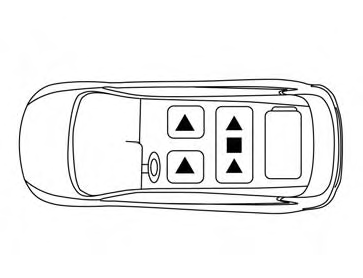
The illustration shows the seating positions equipped with head restraints. The second row head restraints are removable and adjustable.
▲Indicates the seating position is equipped with a head restraint.
■ Indicates the seating position is equipped with an adjustable headrest.
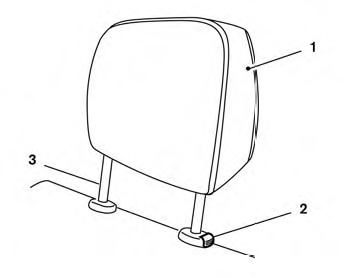
Components
1. Head restraint
2. Lock knob
3. Stalks
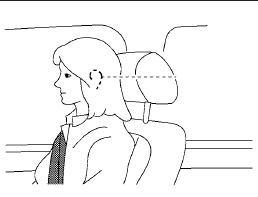
Adjustment
Adjust the head restraint so the center is level with the center of the seat occupant’s ears.
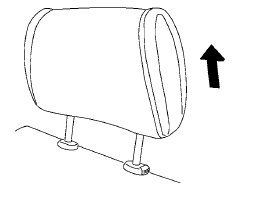
To raise the head restraint, pull it up.
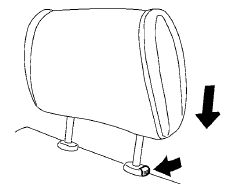
To lower, push and hold the lock knob and push the head restraint down.
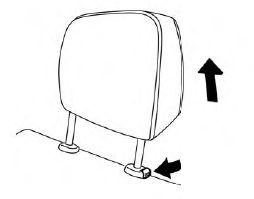
Removal
Use the following procedure to remove the head restraints.
1. Adjust the seat or seatback as necessary.
2. Push and hold the lock knob(s).
3. Pull the head restraint up until it is removed
from the seat.
4. Store the head restraint properly so it is not
loose in the vehicle.
5. Reinstall the head restraint and properly adjust
the seat or seatback before an occupant
uses the seating position.
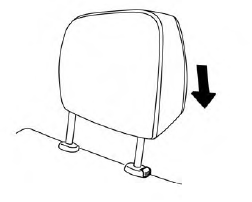
Install
1. Align the head restraint stalks with the holes
in the seat. Make sure the head restraint is
facing the correct direction.
2. Push the head restraint down until it locks in
place.
See also:
Voice recognition system
You can also use the Bluetooth® hands-free
phone system with Voice Recognition System.
INFO
• The available voice commands are only
applicable to the relevant language set in
the LANGUAGE sett ...
Battery
• Keep the battery surface clean
and dry.
Clean the battery with a solution of baking
soda and water.
• Make certain the terminal
connections are
clean and securely tightened.
• If th ...
Steering-wheel-mounted controls for audio (if so equipped)
Menu control switch (models with navigation
system) or audio tuning switch
(models without navigation system)
While the display is showing a MAP (navigation
systems only), STATUS or Audio screen, ...