
Map lights
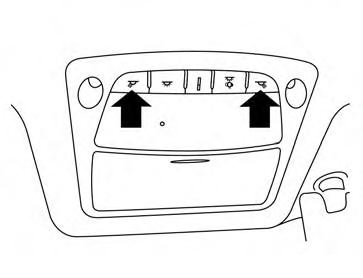
Push the button to turn the map lights on. To turn them off, press the button again.
CAUTION
Do not use for extended periods of time with the engine stopped. This could result in a discharged battery.
See also:
Sonar limitations
WARNING The operating limitations of the sonar system are described below. The driver must
understand these limitations and maneuver the Nissan Murano accordingly. Failure to observe the surroundi ...
Getting started
The following procedures will help you get
started using the Bluetooth® Hands-Free Phone
System with NISSAN Voice Recognition. For additional
command options, refer to “List of voice
commands†...
Anti-lock Braking System (ABS)
WARNING
● The Anti-lock Braking System (ABS) is a
sophisticated device, but it cannot prevent
accidents resulting from careless
or dangerous driving techniques. It can
help maintain vehicle ...