
Cargo light
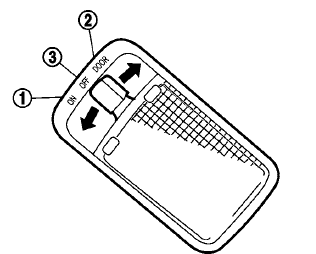
The cargo light on the overhead trim has a threeposition switch. To operate, push the switch to the desired position.
1 ON: The light is illuminated.
2 DOOR: The light illuminates when the liftgate
is opened. The light turns off when the
liftgate is closed.
3 OFF: The light does not illuminate regardless
of liftgate position or lock status.
CAUTION
Do not use for extended periods of time with the engine stopped. This could result in a discharged battery.
See also:
I-BSI system operation
Side BSW/RCTA indicator light
BSW indicator
Intelligent Blind Spot Intervention (I-BSI) indicator
ProPILOT Assist switch
The I-BSI system operates when the vehicle is trave ...
Automatic engine shut-off
The automatic engine shut-off system turns off the engine after it has been left running for an extended period
while the shift position remains in P (Park). This feature helps reduce unnecessary i ...
Programming HomeLink®
If you have any questions or are having difficulty
programming your HomeLink® buttons, refer to
the HomeLink web site at: www.homelink.com or
call 1-800-355-3515.
1. To begin, press and hold ...