
Liftgate release
WARNING
● Always be sure the liftgate has been
closed securely to prevent it from opening
while driving.
● Do not drive with the liftgate open. This
could allow dangerous exhaust gases
to be drawn into the vehicle. See “Exhaust
gas” in the “Starting and driving”
section of this manual.
CAUTION
● If the power liftgate does not stay open or if the liftgate unexpectedly closes at any time while a continuous warning chime sounds, do not operate the liftgate.
There may be a pressure loss in one or both of the liftgate gas stays.
Have the liftgate inspected by a
NISSAN dealer.
● Do not activate the power liftgate if one
or both of the liftgate gas stays are
removed. Damage to the liftgate or
power liftgate mechanisms may occur
Manual liftgate release
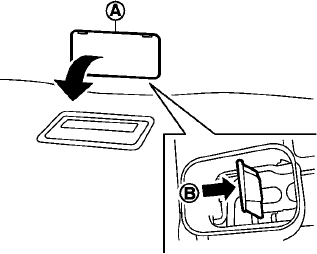
Manual liftgate release (if so equipped)
If the liftgate cannot be locked or unlocked with the door lock switch or the keyfob due to a discharged battery, follow these steps:
1. Remove the cover A on the inside of the
liftgate.
2. Move the lever B as illustrated to open the
liftgate.
Contact a NISSAN dealer as soon as possible for repair.
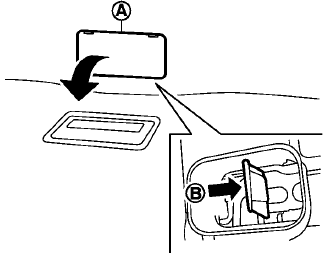
Power liftgate release (if so equipped)
If the liftgate cannot be opened with the instrument panel switch, liftgate opener switch or keyfob due to a discharged battery, follow these steps:
1. Remove the cover A on the inside of the
liftgate.
2. Move the lever B as illustrated to open the
liftgate.
Contact a NISSAN dealer as soon as possible for repair.
See also:
Operational indicators
1. Engine start operation indicator
This indicator appears when the shift lever is in
the P (Park) position.
This indicator means that the engine will start by
pushing the ignition switch with ...
Antenna. Car phone or CB radio
Antenna
Roof Mounted Antenna
The roof-mounted antenna is positioned toward the rear of the Nissan Murano roof. Its location allows it to
receive radio signals while remaining integrated with the ...
Using the system
Initialization
When the ignition switch is placed in the ON
position, NISSAN Voice Recognition is initialized,
which takes a few seconds. When completed,
the system is ready to accept voice comman ...