
Receiving a call
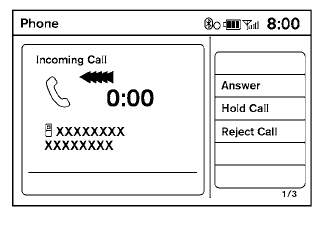
When you hear a phone ring, the display will change to phone mode. To receive a call, follow one of the procedures listed below.
a. Select the “Answer” key on the display.
b. Press the phone  button on the
steering
wheel switches.
button on the
steering
wheel switches.
There are some options available when receiving a call. Select one of the following displayed on the screen.
Answer:
Accept an incoming call to talk.
Hold Call:
Put an incoming call on hold.
Reject Call:
Reject an incoming call.
To finish the call, follow one of the procedures listed below:
a. Select the “Reject Call” key on the display.
b. Press and hold the phone button
on the
steering wheel switches.
See also:
Active Brake Limited Slip (ABLS) system. Chassis control
Active Brake Limited Slip (ABLS) system
The Active Brake Limited Slip (ABLS) system uses automatic brake control to help transfer power away from a
slipping drive wheel and toward the wheel on ...
Injured persons
NISSAN recommends that injured persons use
seat belts. Check with your doctor for specific
recommendations. ...
Sun visors
1 To block glare from the front, swing down the
sun visor.
2 To block glare from the side, remove the sun
visor from the center mount and swing the
visor to the side.
3 Slide the extension ...