
Instrument panel
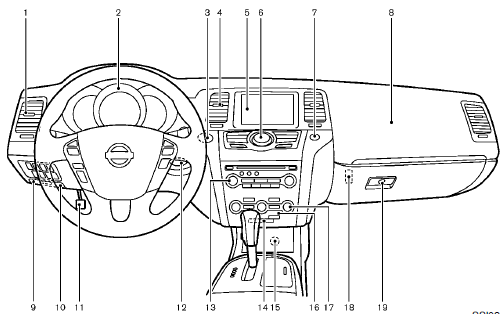
1. Side ventilator
2. Meters and gauges
3. Push-button ignition switch
4. Center ventilator
5. Center display
— Center color display
— Navigation system
6. Heater/air conditioner control or Center multifunction
control panel
— Navigation system
— Vehicle information and setting buttons
— Bluetooth® Hands-Free Phone System
(models with navigation system)
— Bluetooth® Hands-Free Phone System
(models without navigation system)
7. Hazard warning flasher switch
8. Front passenger supplemental air bag
9. Hood release handle
10. Fuse box cover
11. Parking brake
12. Intelligent Key port
13. Audio system
— Clock
14. Front passenger air bag status light
15. Power outlet
16. Rear window and outside mirror defroster
switch
17. Heater/air conditioner control or Audio system
18. Trunk release power cancel switch (Cross-
Cabriolet models)
19. Glove box
*: if so equipped
**: Refer to the separate Navigation System Owner’s
Manual (if so equipped).
See also:
Towing your vehicle
When towing your vehicle, all State (Provincial in
Canada) and local regulations for towing must be
followed. Incorrect towing equipment could damage
your vehicle. Towing instructions are available ...
LATCH Lower Anchors System
LATCH label location (Hardtop models)
LATCH label location (CrossCabriolet models)
Your vehicle is equipped with special anchor
points that are used with the LATCH (Lower
Anchors and Tethers f ...
BSW/LDW malfunction
When the BSW and/or LDW system malfunctions,
they will be turned off automatically, the
BSW light (orange) and/or LDW light (orange)
will illuminate.
Action to take:
Stop the vehicle in a safe ...