
Troubleshooting guide
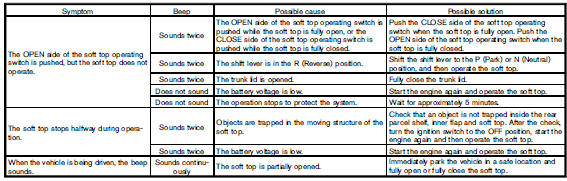
If the soft top stops halfway during operation or does not operate normally, follow the procedures shown in the following table. If the procedures in the following table do not solve the symptom, immediately contact a NISSAN dealer for the inspection.
See also:
Glove box
Open the glove box by pulling the handle. Use the
master key when locking 1 or unlocking 2 the
glove box.
WARNING
Keep glove box lid closed while driving to
help prevent injury in an accident o ...
Vehicle loading information
WARNING
• It is extremely dangerous to ride
in a cargo area inside the vehicle.
In a collision, people riding
in these areas are more likely to
be seriously injured or killed.
• Do not all ...
Air conditioning system refrigerant and lubricant recommendations
The air conditioning system in your
NISSAN vehicle must be charged with the
refrigerant HFC-134a (R-134a) and the oil,
NISSAN A/C system oil Type S or the exact
equivalents.
CAUTION
The use of a ...