
Soft top (CrossCabriolet models)
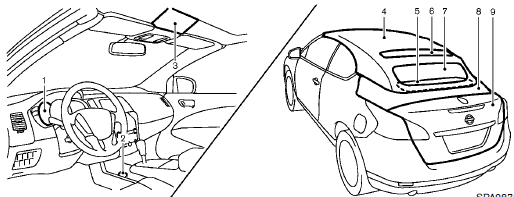
1. Soft top indicator light (on the combination
meter)
2. Soft top operating switch
3. Top lock hole
4. Soft top
5. Rear parcel shelf
6. Skylight glass
7. Rear window
8. Top storage lid
9. Trunk lid
- Before operating the top
- When operating the top
- Luggage cover
- Soft top indicator light
- Automatic window lowering
- Opening the top
- Closing the top
- Opening the top using the Intelligent Key
- Troubleshooting guide
- If the top does not open or close electrically
- Care of the soft top and the vehicle body
See also:
How to park with predicted course
lines
WARNING
If tires of a different size are installed, the predicted course lines may no longer represent the
vehicle's path accurately. Use direct observation and the mirrors when maneuvering ...
Terms
It is important to familiarize yourself with the
following terms before loading your vehicle:
• Curb Weight (actual weight of your
vehicle) - vehicle weight including:
standard and optional equi ...
Vehicle information display warnings and indicators
1. No Key Detected
2. Key ID Incorrect
3. Shift to Park
4. Push ignition to OFF
5. Key battery low
6. Engine start operation for Intelligent Key system
7. Release parking brake
8. Low Fuel
9 ...