
Antenna
Window antenna (for Hardtop models)
The antenna pattern is printed inside the rear window.
CAUTION
• Do not place metalized film near the
rear window glass or attach any
metal parts to it. This may cause
poor reception or noise.
• When cleaning the inside of the rear
window, be careful not to scratch or
damage the rear window antenna.
Lightly wipe along the antenna with a dampened soft cloth.
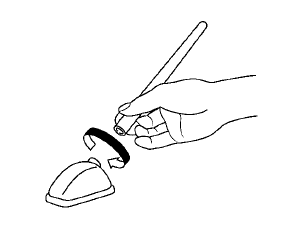
Roof antenna (for Hardtop models) and trunk mounted antenna (for CrossCabriolet models)
Removing the antenna:
You can remove the antenna if necessary.
Hold the bottom of the antenna and remove by turning counterclockwise.
To install the antenna, turn the antenna clockwise and tighten.
CAUTION
• To avoid damaging or deforming the antenna, be sure to remove the antenna under the following conditions.
— The vehicle enters an automatic
car wash (for Hardtop models).
— The vehicle enters a garage with
a low ceiling.
— The vehicle is covered with a car
cover.
• Always properly tighten the antenna rod during installation. Otherwise, the antenna rod may break during vehicle operation.
See also:
Models without color display
The digital clock (in the audio unit) displays the
time when the ignition switch is in the ACC or
ON position.
To adjust the clock, see “FM-AM radio with
Compact Disc (CD) changer” in the †...
Troubleshooting guide
The system should respond correctly to all voice commands without difficulty.
If problems are encountered, follow the solutions given in this guide for the
appropriate error.
Where the solutions ...
Capacities and recommended fuel/lubricants
The following are approximate capacities. The actual refill capacities may
be a little different. When refilling, follow the procedure
instructed in the “8. Maintenance and do-it-yourself” sect ...