
Exterior rear
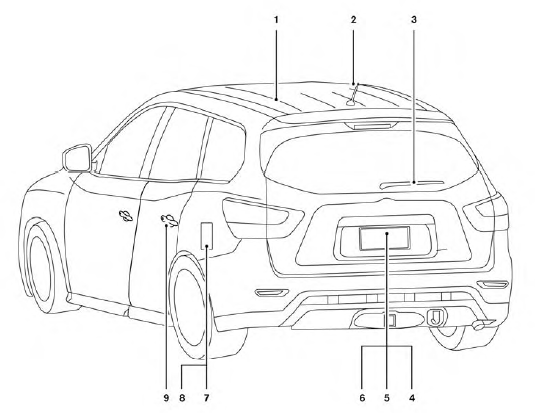
1. Moonroof (if so equipped)/panoramic
sunshade (if so equipped)
2. Antenna
3. Rear window wiper and washer switch
4. Liftgate release
5. Rearview monitor (if so equipped)
6. Replacing bulbs
7. Fuel-filler cap, fuel recommendation
8. Fuel-filler door
9. Child safety rear door lock
See the page number indicated in parentheses for operating details.
See also:
Care and maintenance
Use a lightly dampened, lint free cloth to clean the
surfaces of your Dual Head Restraint DVD System
(DVD player face, screen, remote controller,
etc.).
CAUTION
● Do not use any solvents or ...
OFF button
To change the display brightness, press
the OFF button. Pressing the button
again
will change the display to the day
or the
night display. The brightness can
then be
adjusted using the NI ...
Precautions when starting and driving
WARNING
● Do not leave children or adults who
would normally require the assistance
of others alone in your vehicle. Pets
should also not be left alone. They
could accidentally injure thems ...