
Locking with key
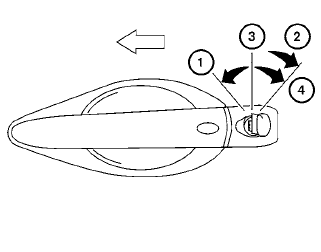
Driver’s side
The power door lock system allows you to lock or unlock all doors at the same time.
Turning the key toward the front 1 of the vehicle locks all doors.
Turning the key one time toward the rear 2 of the vehicle unlocks that door. From that position, returning the key to neutral 3 (where the key can only be removed and inserted) and turning it toward the rear again 4 within 5 seconds unlocks all doors.
Opening and closing windows
The driver’s door key operation allows you to open and close windows equipped with automatic operation at the same time.
● To open the windows, turn the driver’s door
key toward the rear of the vehicle for longer
than 1 second after the door is unlocked.
● To close the windows, turn the driver’s door
key toward the front of the vehicle for longer
than 1 second after the door is locked.
Windows stop when the key cylinder is released.
NOTE:
When the window lock button is pressed the key will not operate the window open or close function.
See also:
Push-button ignition switch positions
LOCK (Normal parking position):
The ignition switch can only be locked in this
position.
The ignition switch will be unlocked when it is
pushed to the ACC position while carrying the
Intelligen ...
Infants
Infants up to at least 1 year old should be placed
in a rear-facing child restraint. NISSAN recommends
that infants be placed in child restraints
that comply with Federal Motor Vehicle Safety
Stan ...
Automatic Transmission Fluid (ATF). Brake fluid. Windshield-washer fluid
Automatic Transmission Fluid (ATF)
When the automatic transmission fluid requires inspection, replacement, or other service, it is recommended that
you visit a NISSAN dealer. Correct fluid selectio ...