
Locking with inside lock knob
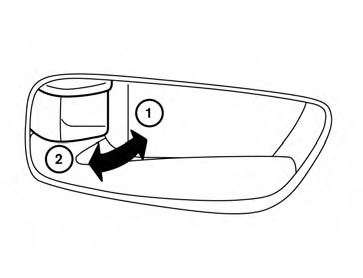
Inside lock
To lock the door without the key, move the inside lock knob to the lock position 1 , then close the door.
To unlock the door without the key, move the inside lock knob to the unlock position 2 .
See also:
Engine compartment
CAUTION
Never use a fuse of a higher or lower
amperage rating than that specified on
the fuse box cover. This could damage
the electrical system or cause a fire.
If any electrical equipment doe ...
Three-point type seat belt
WARNING
• Every
person who drives or rides in
this vehicle should use a seat belt at
all times.
• Do not ride in a
moving vehicle
when the seatback is reclined. This
can be dangerous. Th ...
Cargo light
The cargo light on the overhead trim has a threeposition
switch. To operate, push the switch to
the desired position.
1 ON: The light is illuminated.
2 DOOR: The light illuminates when the liftg ...