
Rear seat air conditioner
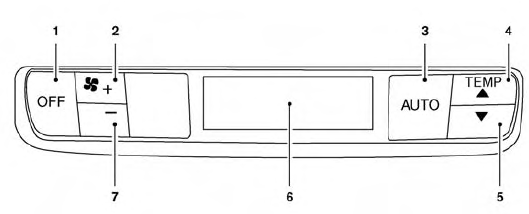
1. OFF button
2. Fan speed increase (+) button
3. AUTO button
4. Temperature increase ( )
button
)
button
5. Temperature decrease ( )
button
)
button
6. Display
7. Fan speed decrease (-) button
The rear seat passengers can adjust the rear automatic air conditioning system using the control switches at the rear of the center console.
To activate the rear control buttons, press the REAR button on the front air conditioner control panel.
OFF button: Turns rear automatic air conditioning system off.
Fan speed increase and decrease buttons: Adjusts the rear fan speed up or down.
AUTO button: Turns rear automatic air conditioning system on, AUTO mode on.
Temperature increase and decrease buttons: Adjusts the rear temperature up or down.
See also:
Starting the engine
1. Apply the parking brake.
2. Move the selector lever to the P (Park) or N (Neutral) position. (P is recommended.)
The starter is designed so that it does not operate unless the selector lever
is ...
Moonroof (if so equipped)
- In an accident you could be thrown from the vehicle through an open moonroof.
Always use seat belts and child restraints.
- Do not allow anyone to stand up or extend any portion of their body o ...
Vehicle load capacity
Basic information
Before driving the Nissan Murano with passengers, luggage, or other cargo, verify that the total loaded weight
does not exceed the Gross Vehicle Weight Rating (GVWR) or either G ...