
Air cleaner
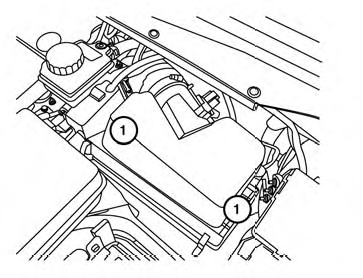
NOTE:
The air cleaner filter should not be cleaned and reused.
Replace the air cleaner filter according to the maintenance log shown in the “Warranty Information and Maintenance Booklet.” To remove the air cleaner filter:
1 Unlatch the clips and move the air cleaner cover upward.
Remove the air cleaner filter and wipe the inside of the air cleaner filter housing and the cover with a damp cloth.
NOTE:
After installing a new air cleaner, make sure the air cleaner cover is seated in the housing and latch the clips.
WARNING
● Operating the engine with the air
cleaner removed can cause you or others
to be burned. The air cleaner not
only cleans the air, it stops the flame if
the engine backfires. If it isn’t there, and
the engine backfires, you could be
burned. Do not drive with the air cleaner
removed, and be careful when working
on the engine with the air cleaner
removed.
● Never pour fuel into the throttle body or
attempt to start the engine with the air
cleaner removed. Doing so could result
in serious injury.
In-cabin microfilter
The in-cabin microfilter restricts the entry of airborne dust and pollen particles and reduces some objectionable outside odors. The filter is located behind the glove box. Refer to the “NISSAN Service and Maintenance Guide” for change intervals.
If replacement is required, see your NISSAN dealer.
See also:
Small children
Children that are over 1 year old and weigh at
least 20 lbs (9 kg) should remain in a rear-facing
child restraint as long as possible up to the
height or weight limit of the child restraint.
Chi ...
Engine oil and oil filter recommendation
1. API certification mark
2. API service symbol
Selecting the correct oil
It is essential to choose the correct grade,
quality, and viscosity engine oil to ensure
satisfactory engine life and p ...
Battery
Basic information
No exposed flames, no sparks
WARNING Do not expose the battery to open flames, electrical sparks, or any
other ignition source. Hydrogen gas produced by the ...