
Changing the meter screen view
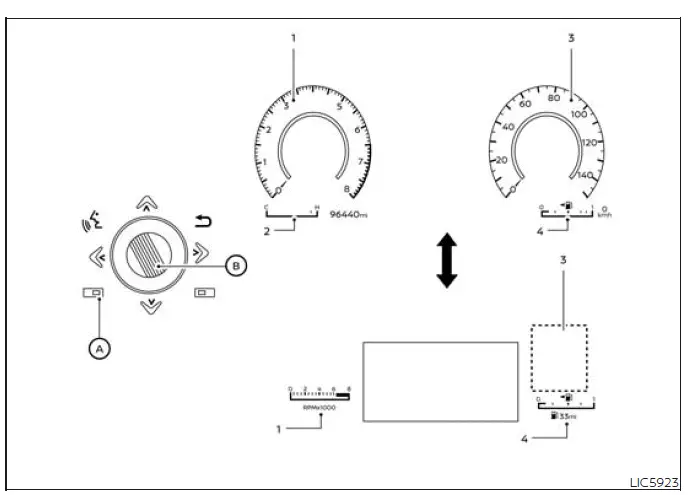
- Tachometer
- Engine coolant temperature gauge
- Speedometer
- Fuel gauge
For models with the full-screen display, the meter screen view can be changed to expand the vehicle information display. This layout gives the driver a larger information area in the instrument cluster while still keeping the essential gauges visible for quick reference.
To change the meter screen view, use the steering wheel controls and follow the on-screen menu sequence shown in the vehicle information display:
1. Press the shortcut menu button A on the right side of the steering wheel.
"Shortcut Menu" appears on the vehicle information display. From this menu, the driver can access display-related options without opening the main settings path.
2. Select "Change Meter View" by rotating the scroll dial B and pushing it to change the view. The selected meter layout will then be applied to the Nissan Murano display, allowing the screen to present driving information in the preferred format.
Oil control system
The oil control system can be accessed in the Maintenance portion of the vehicle information display settings. This area is used to review engine oil service information and to follow the maintenance reminder shown by the system.
Engine oil information informs the distance to oil change. Never exceed one year or 7,500 miles (12,000 km) between oil change intervals for the 2.0L 4 cylinder (KR20DDET engine model). Even if the display has not yet shown a severe reminder, the time and mileage limits should be treated as the maximum interval for proper engine care.
Display when ignition is ON
- Engine Oil Service due in xxx miles
- Display timing: Remaining oil life is less than 940 miles (1500 km).
- Action Required: Plan to have your vehicle serviced. At this stage, the reminder is giving advance notice so service can be scheduled before the oil life reaches the end of its calculated range.
- Engine Oil Service due
- Display timing: Remaining oil life is
0 miles (0 km).
Action Required: Have your vehicle serviced within two weeks or less than 500 miles (800 km). This message means the oil service interval has been reached, so the vehicle should not be driven for an extended period without changing the engine oil.
- Display timing: Remaining oil life is
0 miles (0 km).
The oil change interval cannot be adjusted manually. The system determines the interval automatically, so the driver should follow the displayed service information rather than trying to set a custom oil life value.
The distance to oil change interval is calculated depending on the driving conditions and set automatically by the oil control system. Because driving conditions can vary, the reminder is based on system calculation rather than a simple fixed display value.
A reminder will be displayed when approaching the end of the service interval. This gives the driver time to arrange oil service before the interval is fully reached.
When the Factory Reset option is selected in the vehicle information display, the oil control system will also be reset to initial value. Please change the engine oil when Factory Reset is selected. Resetting the system without replacing the oil may cause the Nissan Murano to show oil service information that no longer matches the actual condition of the engine oil.
CAUTION
- If the oil replacement indicator is displayed, change the engine oil within two weeks or less than 500 miles (800 km). Delaying service after this message appears can leave the engine operating with oil that has reached the end of its intended service life.
- Operating the vehicle with deteriorated oil can damage the engine. Proper oil service is essential for lubrication, cooling, and long-term engine protection.
To reset oil control system, use the vehicle information display after the oil service has been completed:
1. Place the ignition switch in the ON position.
2. Press the
 and
and
 buttons located
on the steering wheel until "Settings" displays
in the vehicle information display.
buttons located
on the steering wheel until "Settings" displays
in the vehicle information display.
Use the scroll dial to select "Maintenance". This menu contains service-related display items, including the oil control system.
Then, press the scroll dial to open the selected maintenance menu.
3. Select "Oil Control System" and press the scroll dial. This opens the oil service information and reset area.
4. Press the scroll dial according to the reset instructions displayed at the bottom of the screen. Follow the prompts carefully so the oil control system is reset only after the appropriate service has been performed.
See also:
Manual operation
Fan speed control
Use the fan speed control buttons on the control panel or the corresponding keys on the climate control screen to
adjust the fan speed manually. Select a lower setting for gentl ...
Operating range
The Intelligent Key functions are available only when the Intelligent Key is located within the specified
operating range of a door request switch 1 or the liftgate opener switch 2. The s ...
Settings
The setting mode allows you to change the information
displayed in the vehicle information display:
● Main Menu Selection
● Body Color
● Maintenance
● Alarms
● Vehi ...