
Operating range
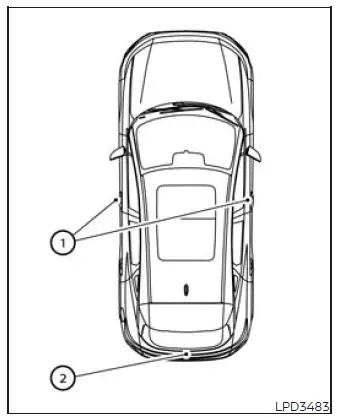
The Intelligent Key functions are available only when the Intelligent Key is located within the specified operating range of a door request switch 1 or the liftgate opener switch 2. The system must be able to detect the key near the corresponding access point before it can lock or unlock the doors or release the liftgate.
If the Intelligent Key battery is discharged or strong radio waves are present near the vehicle, the effective operating range may become narrower. Under these conditions, communication between the Intelligent Key and the Nissan Murano may be interrupted, delayed, or temporarily unavailable.
The normal operating range extends approximately 31.5 in (80 cm) from each door request switch 1 and from the liftgate opener switch 2. The actual detection area may vary slightly depending on the position of the Intelligent Key and the surrounding operating conditions.
If the Intelligent Key is positioned too close to the door glass, a door handle, or the rear bumper, the system may have difficulty detecting it correctly. As a result, the door request switches or liftgate opener switch may not respond even though the key appears to be close to the vehicle.
Whenever the Intelligent Key is within the operating range, another person may be able to press a request switch to lock or unlock the doors or use the liftgate opener switch, even if that person is not carrying the key. Keep control of the Intelligent Key and remain aware of who is near the Nissan Murano while these functions are available.
Door locks/unlocks precaution
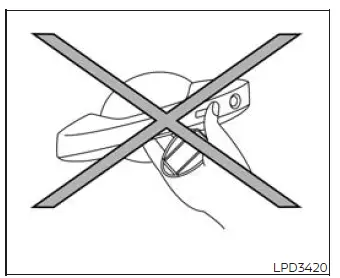
- Do not press the exterior door handle request switch while holding the Intelligent Key directly beside the handle, as illustrated. Because the key is extremely close to the door, the system may have difficulty determining whether it is located inside or outside the vehicle. Move the key slightly away from the handle before operating the request switch.
- After locking the doors with a door handle request switch, confirm that every door is securely locked by gently checking the handles. This verifies that the locking command was received and completed successfully.
- To reduce the possibility of leaving the Intelligent Key inside the vehicle, make sure it is in your possession before closing and locking the doors. Carry the key with you rather than placing it on a seat, in the cargo area, or elsewhere inside the passenger compartment.
See also:
Rise-up and build-up
The system gradually adjusts braking power during
normal braking to help provide an enhanced
brake feel. ...
Luggage side box (Hardtop models)
To open the luggage side box, pull up the strap. ...
RAB system limitations
WARNING The following limitations apply to the Rear Automatic Braking (RAB) system. Failure
to understand and follow these warnings and operating instructions could result in a collision, serious
...