
Manual operation
Fan speed control
Use the fan speed control buttons on the control panel or the corresponding keys on the climate control screen to adjust the fan speed manually. Select a lower setting for gentler airflow or increase the setting when stronger air circulation is required inside the Nissan Murano.
Temperature control
Use the
 ,
,
 controls or the sliding bar on the corresponding side of
the climate control screen to select the desired temperature. The driver's and front passenger's settings can be
adjusted separately when synchronized operation is not active.
controls or the sliding bar on the corresponding side of
the climate control screen to select the desired temperature. The driver's and front passenger's settings can be
adjusted separately when synchronized operation is not active.
Air recirculation
The selected air intake mode changes each time the
 air intake control button is pressed or the corresponding key is touched on the display. This control allows the
system to circulate cabin air, draw in outside air, or regulate the intake mode automatically when that function
is available.
air intake control button is pressed or the corresponding key is touched on the display. This control allows the
system to circulate cabin air, draw in outside air, or regulate the intake mode automatically when that function
is available.
- When air is recirculated within the passenger compartment, the air intake control button and touch-screen key illuminate orange. This mode limits the amount of outside air entering the vehicle.
- When fresh air is drawn into the Nissan Murano from outside, the air intake control button and key appear white.
- When the "
 "
key appears on the climate control screen, the system controls the air intake mode automatically according
to current operating conditions.
"
key appears on the climate control screen, the system controls the air intake mode automatically according
to current operating conditions.
- When the power switch is placed in the ON position, the air conditioning system may automatically select air recirculation to improve cooling efficiency and help the cabin reach the selected temperature more quickly.
Air flow control
Touch the appropriate air flow control key to select the outlets used to distribute air through the passenger compartment. Manual selection allows the driver to direct airflow toward the upper body, foot area, windshield, or an available combination of outlet positions:
-
 Air flows mainly through the center and side vents
toward the upper passenger-compartment area.
Air flows mainly through the center and side vents
toward the upper passenger-compartment area.
-
 Air
flows mainly through the foot outlets.
Air
flows mainly through the foot outlets.
-
 Air flows mainly through the defroster outlets toward
the windshield.
Air flows mainly through the defroster outlets toward
the windshield.
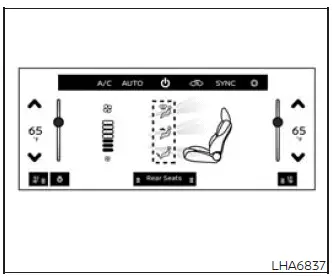
Climate control screen
The climate control screen shows the current airflow status for each available outlet position. This visual layout allows the driver to confirm where conditioned air is being directed before making further adjustments.
Airflow to an individual position can be switched on or off by touching the desired area of the display. The airflow amount can also be changed by swiping across the indicated section of the screen.
Selecting the defrost control directs air toward the windshield to help clear fog, condensation, or frost that may obstruct forward visibility.
For full defrost operation, press the
 Front defroster button. Alternatively, use the
display-screen controls to switch the "A/C" key ON, select fan speed 5 through 7, set the temperature to HI, and
choose the fresh-air intake mode.
Front defroster button. Alternatively, use the
display-screen controls to switch the "A/C" key ON, select fan speed 5 through 7, set the temperature to HI, and
choose the fresh-air intake mode.
If every airflow mode is switched ON at the same time, the climate control system returns to the default airflow arrangement calculated for AUTO operation.
When the selected temperature is adjusted, the color used to display the airflow amount may also change. These colors represent the temperature setting selected for the Nissan Murano cabin and do not indicate the actual temperature of the air leaving the vents.
Synchronize temperature settings
Touch the "SYNC" key to activate synchronized temperature control. The key turns orange while SYNC mode is operating. In this mode, changes made with the driver's-side temperature control button or touch-screen key are applied to both the driver's and front passenger's sides. To leave SYNC mode, adjust the front passenger's temperature independently using the passenger-side control. The "SYNC" key will turn white, indicating that separate temperature settings are active again.
To turn system off
Press the ON·OFF button on the control panel or touch the "
 " key
on the climate control screen. The button and touch-screen key turn white when the heater and air conditioner
system is switched off.
" key
on the climate control screen. The button and touch-screen key turn white when the heater and air conditioner
system is switched off.
See also:
Battery
● Keep the battery surface clean and dry.
Clean the battery with a solution of baking
soda and water.
● Make certain the terminal connections are
clean and securely tightened.
χ ...
Lane Change Assist
Basic information
Lane Change Assist is a ProPILOT Assist 2.1 feature designed to support the driver during certain lane-change
maneuvers. Before using this feature in the Nissan Murano, read the ...
Bluetooth® Hands-Free Phone System (if so equipped)
- Use a phone after stopping your vehicle in a safe location. If you have
to use a phone while driving, exercise extreme caution at all times so full attention
may be given to vehicle operation. ...