
Touch screen display
Basic Information
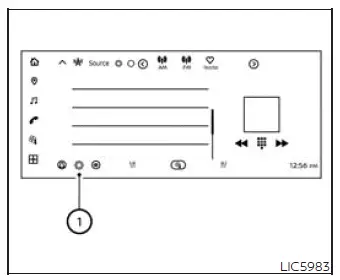
Some of the vehicle equipment/features can be operated using the touch-screen display. This central screen gives the driver and front passenger access to selected vehicle functions, making it possible to review, adjust, or turn supported features on and off from one convenient interface.
Touch the Settings soft key 1 on the touch-screen display to display "All Settings" menu. From this menu, the Nissan Murano organizes available controls into clear categories so the desired vehicle-related setting can be found more easily.
Touch to select your desired item. Once a menu item is selected, follow the on-screen options to adjust the setting, enable a feature, disable a feature, or open a deeper menu when additional choices are available.
Available setting items vary depending on models, specifications, software versions, and conditions. Because equipment and software may differ, some items may appear on one vehicle and not on another.
See the following items for the vehicle-related equipment/features. These sections describe the main areas where touch-screen settings may be available, depending on the installed equipment.
Vehicle
Camera
The following items for the camera can be adjusted or turned on or off. These settings relate to how camera-related information is displayed and how certain camera functions behave when the system is equipped:
- Display Settings
- Save locations
- Automatic 360º Moving
- Vehicle Color
Climate
The following items for the climate can be adjusted or turned on or off. In equipped Nissan Murano models, this area allows climate-related comfort functions to be personalized according to driver and passenger preferences:
- Airflow Intensity
- Auto Recirculation
- Defrost Activates Front & Rear
- Heated Steering Wheel Sensitivity
- Driver Auto Seat Sensitivity
- Passenger Auto Seat Sensitivity
Seat
The following items for the seat can be adjusted or turned on or off. When the related seat feature is available, the touch-screen display provides access to comfort settings from the vehicle menu:
- Massage Settings
Interior Light The following items for the interior light can be adjusted or turned on or off. These settings allow the cabin lighting presentation to be customized by location or lighting theme when the vehicle is equipped with the corresponding ambient lighting functions.
- Ambient Lighting
(Locations)
- Front
- Rear (Colors)
- ProPILOT Assist Mode
- Delight
- Discovery
- Passion
- Harmony
See also:
Cold weather driving
Freeing a frozen door lock
To prevent a door lock from freezing, apply deicer through the key hole. If the
lock becomes frozen, heat the key before inserting it into the key hole or use the
remot ...
View malfunction
When the “!” icon is displayed on the screen, the
Around View Monitor may not be calibrated correctly.
This will not hinder normal driving function
but the system should be inspected by a N ...
RearView Monitor system limitations
WARNING
The limitations of the RearView Monitor are described below. Failure to understand these restrictions or to
operate the vehicle accordingly could result in a collision, serious injury, o ...