
Basic Information
WARNING
- Failure to correctly adjust the brightness and position of the displayed image may interfere with the driver's ability to see clearly through the windshield. Reduced forward visibility could cause an accident resulting in severe injury or death.
- Do not focus on or use the head up display for extended periods while driving. Looking at the display too long may prevent you from seeing other vehicles, pedestrians, road hazards, or objects ahead, which could cause an accident resulting in severe injury or death.
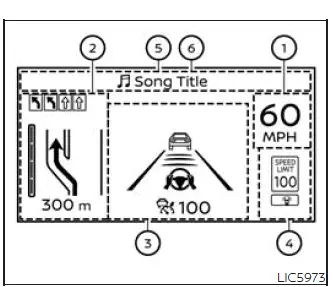
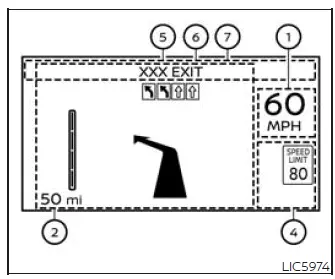
The HUD can display one or more of the following features when equipped on the Nissan Murano:
- Vehicle speed
- Navigation
- Driving Assist
- Traffic Sign
- Audio
- TEL/SMS
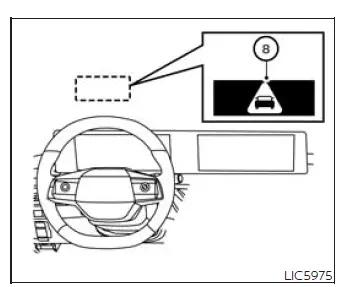
- Message for Driver Assistance
- Warning message
NOTE:
- Do not place any type of liquid on or near the projector. Liquid exposure may cause the equipment to malfunction.
NOTE:
- Do not touch any internal parts of the projector. Contact with internal components may cause the equipment to malfunction.
- To help prevent scratches on the projector glass, do not place sharp objects on or near the projector opening.
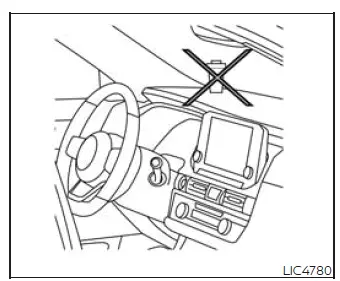
- Do not place objects on the instrument panel that may block, distort, or interfere with the HUD image.
- If you wear polarized sunglasses, the display may be difficult to see. Increase the HUD brightness using the vehicle information display or remove your sunglasses if necessary.
- Depending on weather and lighting conditions, such as rain, snow, bright sunlight, or glare, the display may be difficult to see.
- For cleaning, use a clean, dry, soft cloth.
If dirt or other residue cannot be removed, use a clean, soft cloth dampened with water, and then wipe the area again with a clean, dry, soft cloth.
Never use a rough cloth, alcohol, benzine, thinner, any type of solvent, or a paper towel containing a chemical cleaning agent. These materials may scratch or discolor the projector lens. Do not spray liquid, including water, directly onto the projector lens, because spraying liquid may cause the system to malfunction.
- If the displayed image appears distorted, it is recommended that you have the system inspected by a NISSAN dealer or qualified workshop.
- The HUD uses a special windshield that allows the projected image to be displayed clearly.
If the windshield of the Nissan Murano needs to be replaced, the replacement should be completed by a NISSAN dealer.
See also:
Chrome parts
Clean all chrome parts regularly with a nonabrasive
chrome polish to maintain the finish. ...
I-BSI system limitations
WARNING The limitations of the Intelligent Blind Spot Intervention (I-BSI) system are
described below. Failure to operate the Nissan Murano in accordance with these limitations, or relying on
...
Soft top indicator light
The soft top indicator light in the instrument
panel shows the conditions of top operation.
The light illuminates when the soft top is being
operated or if it is stopped before reaching the
fu ...