
Rear Door Alert. Power outlets. USB/iPod charging ports
Rear Door Alert
The Rear Door Alert system is designed to operate under specific conditions and remind the driver that an object, item, or passenger may be present in the rear seat area. Before leaving the Nissan Murano, always check the rear seat(s) carefully, even if no alert is shown.
The Rear Door Alert system is initially disabled.
The driver can enable the system through the vehicle information display, where the alert settings can be selected according to preference.
When the system is enabled:
- The system is activated when a rear door is opened and closed within 10 minutes before the vehicle is driven. When the driver door is closed and the system is active, a visual message appears in the vehicle information display to remind the driver that the rear seat area may need attention.
- If a rear door is opened and closed but the vehicle is not driven within approximately 10 minutes, the system will not activate. For the alert to become active, a rear door must be opened and closed, and the vehicle must then be driven within 10 minutes.
When the Rear Door Alert system is activated:
- When the driver shifts the vehicle into the P (Park) position, a notification message appears in the vehicle information display with the options to "Dismiss Message" or "Disable Alert" if the driver chooses to change the alert behavior for that stop.
- Select "Disable Alert" to temporarily disable the alert for that stop.
- If no selection is made, or if "Dismiss Message" is selected, the alert remains enabled for that stop.
- If the alert remains enabled when the driver exits the Nissan Murano, a message will appear in the vehicle information display stating "Check Rear Seat."
If the "Horn & Alert" setting is selected:
- An audible horn sound will occur after a short time unless a rear door is opened and closed within a short time to deactivate the alert.
- If the doors are locked before the alert is deactivated by opening a rear door, the horn will sound.
- If the liftgate is opened before a rear door is opened, the horn alert will be delayed until after the liftgate is closed.
NOTE: If the "Alert Only" setting is selected, the message alert will still appear in the vehicle information display, but the horn will not sound.
WARNING
- If the driver selects "Disable Alert", no audible alert will be provided regardless of whether a rear door has been opened or closed.
- There may be situations where an object or passenger is in the rear seat(s), but the audible alert does not sound. For example, this can occur if rear seat passengers enter or exit the vehicle during a trip.
- The system does not directly detect objects, children, pets, or passengers in the rear seat(s). Instead, it detects rear door opening and closing activity, which may indicate that something or someone could be in the rear seat area.
NOTE: There may also be times when the horn sounds even though there are no objects or passengers in the rear seat(s).
Power outlets
12v outlet
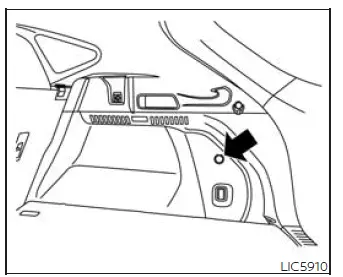
Cargo Area
The power outlet is intended for supplying power to compatible electrical accessories, such as cellular telephones and similar low-power devices.
It is rated at 12 volt, 120W (10A) maximum.
The vehicle's power outlet operates only when the ignition switch is in the ACC or ON position.
Open the cap to access and use the power outlet in the Nissan Murano.
CAUTION
- The outlet and the plug may become hot during use or immediately after use.
- Do not use accessories that exceed a 12 volt, 120W (10A) power draw.
- Do not use double adapters or connect more than one electrical accessory to the outlet.
- Use the power outlet with the engine running to help avoid discharging the vehicle battery.
- Avoid using the power outlet when the air conditioner, headlights, or rear window defroster is operating, because these systems also place demand on the vehicle's electrical system.
- Before inserting or disconnecting a plug, make sure the electrical accessory being used is turned off.
- Push the plug in as far as it will go. If proper contact is not made, the plug may overheat or the internal temperature fuse may open.
- When the outlet is not in use, be sure to close the cap. Do not allow water or any other liquid to contact the outlet.
USB/iPod charging ports
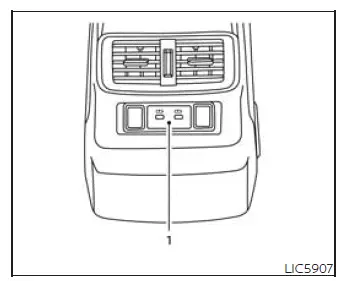
Rear
seat area
- Type-C USB
The USB/iPod charging ports are located in the rear seat area on the back of the center console, giving rear passengers a convenient place to connect and charge compatible devices. These ports are intended for charging supported equipment and help keep portable electronics powered while traveling in the Nissan Murano.
NOTE:
- Only the USB connection port(s) located below the instrument panel allow USB/iPod devices to be operated through the audio system. The rear seat area ports are used for charging compatible devices.
- For best results, it is recommended to use the manufacturer's cables, which are sold separately. A USB Type-C adapter may also be purchased separately; however, charging or connection performance may vary depending on the device, cable, or adapter being used.
See also:
Bluetooth® streaming audio (models with navigation system)
Your NISSAN is equipped with Bluetooth®
Streaming Audio. If you have a compatible
Bluetooth® device with streaming audio (A2DP
profile), you can set up the wireless connection
between your Bluet ...
Supplemental air bag warning labels
Warning labels about the supplemental frontimpact
air bag system are placed in the vehicle
as shown in the illustration.
SRS air bag
The warning labels 1 are located on the
surface of the sun ...
System components
CAUTION
● The glass screen on the liquid crystal
display may break if hit with a hard or
sharp object. If the glass breaks, do not
touch the liquid crystalline material. In
case of contact ...