
Magnetic Wireless charger
Basic Information
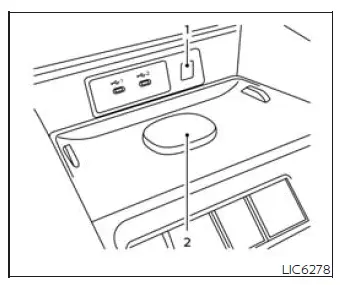
- Indicator
- Charging pad
The magnetic wireless charger in the Nissan Murano is located at the front of the center console, below the climate control system. To begin charging, place the smartphone in the center of the charging pad (2). When the phone is positioned correctly and the device is compatible, charging starts automatically.
The smartphone continues charging while the ignition switch is in the ON position.
WARNING
- Never place metallic materials between the wireless charger and a smartphone, because they may interfere with charging and can become hot.
- People who use a pacemaker or other electric medical equipment should contact the medical equipment manufacturer before using the magnetic wireless charger to confirm any possible effects.
- Never cover the smartphone with cloth or similar material during the charging process.
- Never charge a smartphone when it is wet.
- Never place metallic materials or small items such as an Intelligent Key or memory drive on the charging pad or between the smartphone and charger.
CAUTION
- Do not place an RFID card, NFC card, or credit card between the wireless charger and a smartphone. Doing so could corrupt or damage the data stored on the card.
- Do not use the wireless charger when dust, dirt, or debris has accumulated on the charging pad.
- Do not hit or apply impact to the surface of the wireless charger.
- Do not spill liquid such as water, drinks, or similar fluids on the charging pad.
- Do not use grease, oil, alcohol, or similar substances when cleaning the charging pad.
Wireless charger indicator
The indicator (1) illuminates in orange when the charging process starts.
When charging is completed, the indicator illuminates in green.
If a malfunction occurs or the charging process stops, the indicator blinks in orange for 8 seconds and then turns off.
Wireless charger operation
To use the magnetic wireless charger, place your phone on the charging pad (2), aligning the center of the phone with the center of the pad. To help optimize charging performance in the Nissan Murano, use a Qi2 compatible phone or a phone case equipped with a magnetic ring so the phone can attach and align properly on the magnetic charger.
Some smartphone cases, including cases without a magnetic ring or cases with certain accessories attached, may interfere with wireless charging. Remove such cases or accessories before placing the phone on the charging pad.
Turn off the smartphone vibration function before wireless charging so the phone does not move out of position while charging.
NOTE:
- Only a Qi or Qi2 compatible smartphone can be used with the wireless charger.
- An audible fan noise may be heard during charging operation. This is a normal part of the charging process and does not indicate a malfunction.
- The smartphone may become warm during charging, and charging may stop because of the protection function of the wireless charger. This is not a malfunction. If this occurs, restart charging after the smartphone has cooled down. The indicator will blink in orange and then turn off.
- The wireless charging process may stop depending on the smartphone status, including battery temperature or other device conditions.
- If radio noise interference occurs during the charging process, place the smartphone in the center of the wireless charger.
- The wireless charging process will stop while the vehicle is searching for the Intelligent Key.
- The wireless charging process will not start when a USB (Universal Serial Bus) cable is connected to the smartphone.
-
The indicator may illuminate in orange or blink if the smartphone is placed on the wireless charger while a USB cable is connected. In this condition, wireless charging is not performed.
- Depending on the smartphone type and its charging behavior, the indicator may remain illuminated in orange even after the charging process has been completed.
This device complies with part 15 of the FCC Rules and RSS-Gen of IC Rules.
Operation is subject to the following two conditions:
(1) This device may not cause harmful interference, and
(2) This device must accept any interference received, including interference that may cause undesired operation.
Changes or modifications not expressly approved by the party responsible for compliance could void the user's authority to operate the equipment.
RF Radiation Exposure Statement: This equipment complies with FCC RF Radiation exposure limits set forth for an uncontrolled environment.
This device and its antenna must not be co-located or operated together with any other antenna or transmitter.
This equipment should be installed and operated with a minimum distance of 15 cm between the radiator and your body.
ISED Compliance Statement
This device complies with RSS-Gen of IC Rules.
Operation is subject to the following two conditions:
(1) This device may not cause harmful interference, and
(2) This device must accept any interference received, including interference that may cause undesired operation.
Changes or modifications made to this device that are not expressly approved by the party responsible for compliance will void the user's authority to operate the equipment.
ISED RF Radiation Exposure Statement: This equipment complies with ISED RF Radiation exposure limits set forth for an uncontrolled environment. This device and its antenna must not be co-located or operated together with any other antenna or transmitter. This equipment should be installed and operated with a minimum distance of 15 cm between the radiator and the end user's body and arms while using the wireless charging equipment in the Nissan Murano.
See also:
Engine protection mode
The engine is equipped with a protection mode designed to reduce the risk of damage when the coolant temperature
rises excessively. This may occur under demanding conditions, such as climbing steep ...
Vehicle Dynamic Control (VDC) system
The Vehicle Dynamic Control (VDC) system uses
various sensors to monitor driver inputs and vehicle
motion. Under certain driving conditions,
the VDC System helps to perform the following
functions ...
Troubleshooting guide
The system should respond correctly to all voice
commands without difficulty. If problems are encountered,
follow the solutions given in this guide
for the appropriate error.
Where the solutions ...