
Memory seat
Basic information
The memory seat system provides several functions designed to preserve preferred driving positions and make entering or leaving the Nissan Murano more convenient:
- Memory storage for selected driving positions.
- Linking a memorized position to a stored user profile and registered Intelligent Key.
- An entry/exit function that creates additional space around the driver's seat.
NOTE: The steering wheel memory function is available only on vehicles equipped with power steering wheel adjustment.
When a memory position is linked to a stored user profile, the system automatically saves the driver's most recent seat, outside mirror, and steering wheel positions when the ignition is changed from ON to OFF. These positions are assigned to the user profile currently active in the vehicle.
Memory switch 1 and memory switch 2 on the driver's door can each store an additional driving position. Positions saved with these door-mounted switches operate independently of the positions linked to a user profile and Intelligent Key.
The entry/exit function automatically repositions the driver's seat and, when equipped, the steering wheel to provide more room for the driver to enter or leave the vehicle.
Memory storage function
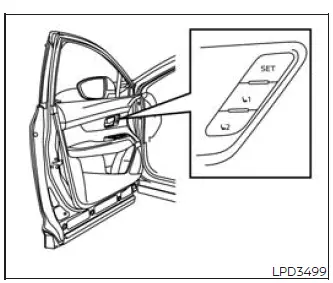
Basic information
The door-mounted memory controls can store two individual positions for the driver's seat, outside mirrors, and power-adjustable steering wheel. These positions are saved with memory switches M1 and M2 shown in the illustration. The door memory switches function separately from the memory settings associated with a user profile.
Use the following procedure to store a driving position in the memory system:
1. Place the ignition switch in the ON position. The transmission should remain in the P (Park) position while a memory setting is being stored.
2. Use the appropriate adjustment controls to move the driver's seat, steering wheel, and outside mirrors to the desired positions. Confirm that each setting provides a comfortable driving posture and a clear view around the Nissan Murano.
3. Press the SET switch and, within 5 seconds, press memory switch 1 or 2.
4. The indicator light for the selected memory switch will illuminate and remain on for approximately 5 seconds.
5. A chime will sound when the position has been stored successfully.
NOTE: A position saved with memory switch 1 or 2 is not automatically linked to a user profile or Intelligent Key.
Recalling switch memory positions
To recall a position stored manually, press memory switch 1 or 2. The driver's seat, outside mirrors, and power-adjustable steering wheel will move to the positions assigned to the selected switch.
Confirming memory storage
- Press the SET switch.
- If a position has been stored under memory switch 1 or 2, the indicator light for the corresponding switch will remain illuminated for approximately 5 seconds.
Linking the memory position to a stored user profile and Intelligent Key
A registered Intelligent Key can be linked to a stored user profile and its associated driving position by completing the following procedure:
1. Carry the Intelligent Key registered for the intended user and place the ignition switch in the ON position.
NOTE: By default, the vehicle may be configured with one Intelligent Key linked to a user profile and another key that is not linked. If both Intelligent Keys need separate personalized settings, create a second user profile and link the additional key to it. For the clearest and most consistent operation, each user profile should normally be associated with one Intelligent Key.
NOTE: Make sure only one Intelligent Key is inside the vehicle during the linking procedure. If multiple registered keys are present, the Nissan Murano may detect and associate the wrong Intelligent Key with the selected user profile.
2. Adjust the driver's seat, outside mirrors, and power-adjustable steering wheel to the preferred driving positions.
3. Place the ignition switch in the OFF position. The current positions will be saved to the active user profile.
The next time the vehicle is entered with the corresponding registered Intelligent Key and the ignition is switched to ON, the system will automatically recall the driving position stored for that user.
NOTE: The "Guest" profile cannot be linked to an Intelligent Key and does not permanently save a driving position. When the ignition switch is placed in the ON position while the Guest profile is active, the system will recall the most recently used registered profile rather than a Guest memory position.
If both registered Intelligent Keys are inside the vehicle at the same time, only the most recently used Intelligent Key will be used to recall a memory profile.
Performing a factory reset removes all user profiles stored in the multimedia display. Follow the user-creation procedure in the separate NissanConnect Owner's Manual, if equipped. The Intelligent Key detected inside the vehicle during creation of the new user profile will be linked to that profile automatically.
The vehicle may be delivered with a User 1 profile already created and linked to one of the Intelligent Keys. A factory reset must be performed if this existing profile needs to be deleted.
Entry/exit function
The entry/exit function is designed to reposition the driver's seat and power-adjustable steering wheel automatically when the transmission is in P (Park).
By creating more space around the driver's position, the function can make entering and leaving the Nissan Murano easier.
The driver's seat will slide rearward and the steering wheel will move upward under either of the following conditions:
- When the ignition is in the OFF position and the driver's door is opened.
- When the ignition is changed from ON to OFF while the driver's door is already open.
The driver's seat and steering wheel will return to their previous driving positions under the following condition:
- When the ignition switch is placed in the ON position while the transmission remains in P (Park).
The entry/exit function can be enabled or disabled through the "Vehicle Settings" menu in the vehicle information display by changing the following options:
- Change Exit Seat Slide from ON to OFF to disable rearward movement of the driver's seat.
- Change Exit Steering Up from ON to OFF to disable upward movement of the steering wheel.
NOTE: If the Guest profile is used during a trip and the seat is adjusted manually, changing the ignition from ON to OFF will move the seat and steering wheel to the easy-exit positions stored for the most recently used registered user profile. The manually adjusted Guest position will not be used as the easy-exit setting.
System operation
The memory seat system may not begin operating, or may stop before completing its movement, under any of the following conditions:
- When the vehicle is traveling faster than 2 mph (3 km/h).
- When memory switch 1 or 2 is pressed while the memory seat system is already moving the stored components.
- When a driver's seat or steering wheel adjustment switch is operated during memory recall.
- When the seat is already in the memorized position selected by the driver.
- When no driving position has been stored under the selected memory switch.
- When the transmission is shifted from P (Park) into another position while the system is operating.
See also:
Vehicle Dynamic Control (VDC) system
The Vehicle Dynamic Control (VDC) system uses various sensors to monitor driver
inputs and vehicle motion. Under certain driving conditions, the VDC system helps
to perform the following functions ...
Remote keyless entry system
WARNING
The Intelligent Key transmits radio
waves when the buttons are pushed.
The FAA advises that radio waves may
affect aircraft navigation and communication
systems. Do not operate the
Int ...
Liftgate release
WARNING
● Always be sure the liftgate has been
closed securely to prevent it from opening
while driving.
● Do not drive with the liftgate open. This
could allow dangerous exhaust gase ...