
Basic Information. RearView Monitor system operation
Basic Information
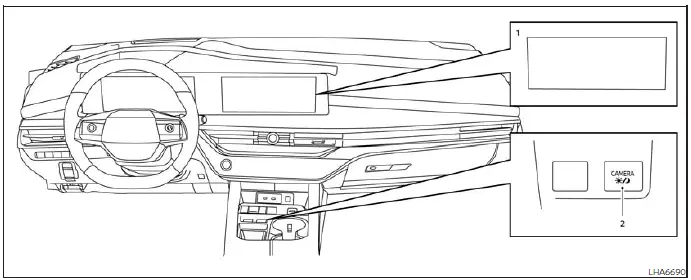
- Display screen used to show the camera image, guide lines, and related visual information.
- CAMERA button used to control available RearView Monitor display functions.
WARNING
- Failure to follow the warnings and operating instructions for the RearView Monitor could result in a collision, serious injury, or death.
- The RearView Monitor is a driver-assistance feature and cannot replace careful backing procedures. Before moving the Nissan Murano in reverse, turn and look through the windows, check the inside and outside mirrors, and confirm that the area behind and beside the vehicle is clear. Always reverse slowly and remain prepared to stop.
- The system is intended to help the driver identify large, stationary objects located directly behind the vehicle and reduce the possibility of vehicle damage. It may not display every obstacle, person, animal, or object within the surrounding area.
- Use the distance guide lines and vehicle width lines only as general references when the vehicle is positioned on a level, paved surface. Distances shown on the display may differ from the actual space between the Nissan Murano and an object appearing in the camera image.
CAUTION When removing dirt, water, ice, or snow from the camera area, clean it carefully and avoid scratching the camera lens. Damage to the lens may reduce image clarity and affect RearView Monitor performance.
The RearView Monitor automatically displays the area behind the vehicle when the R (Reverse) button is pressed. While the transmission remains in R (Reverse), pressing the CAMERA button switches the predicted course lines off or on. Audio from the radio can continue playing while the rear camera image is shown.
RearView Monitor system operation
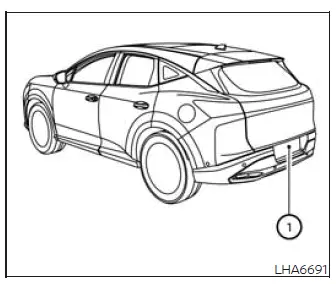
The RearView Monitor uses camera 1, located directly above the rear license plate, to provide an image of the area behind the vehicle. Keep the camera lens clean and unobstructed so the displayed view remains as clear as possible.
With the vehicle switched ON, press the shift button to select the R (Reverse) position. The RearView Monitor will then activate automatically and display the rear camera image on the screen.
How to read the displayed lines
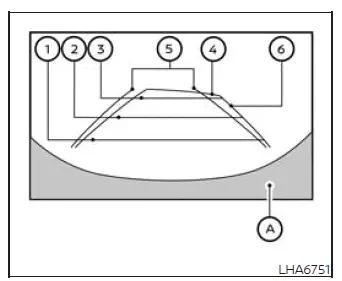
The monitor displays guide lines that represent the approximate vehicle width and the distance to objects in relation to vehicle body reference line A. These markings are intended to support careful maneuvering and should always be considered together with direct visual checks of the surrounding area.
Distance guide lines
The distance guide lines indicate approximate distances measured rearward from the vehicle body:
- Red line 1: approximately 1.5 ft (0.5 m) from the vehicle.
- Blue line 2: approximately 3 ft (1 m) from the vehicle.
- Blue line 3: approximately 7 ft (2 m) from the vehicle.
- Blue line 4: approximately 10 ft (3 m) from the vehicle, if so equipped.
Vehicle width guide lines 5
The vehicle width guide lines show the approximate width of the Nissan Murano while backing up. Use them to help estimate side clearance, but continue checking the mirrors and the areas beside the vehicle.
Predicted course lines 6
The predicted course lines indicate the approximate path the vehicle may follow while reversing. They appear when the transmission is in R (Reverse) and the steering wheel is turned. As the steering angle changes, the lines move to represent the revised projected direction of travel.
The displayed vehicle width guide lines and predicted course lines are shown wider than the vehicle's actual width and path. Treat them as visual references rather than exact boundaries when maneuvering near obstacles.
See also:
Hazard warning flasher switch
Press the hazard warning flasher switch to alert other road users when the Nissan Murano must be stopped or
parked because of an emergency. When the switch is activated, all turn signal l ...
Specifications. When traveling or registering in another
country
Specifications
Engine
Engine model
The Nissan Murano is equipped with a 2.0-liter, four-cylinder KR20DDET engine.
Engine type
Gasoline-powered, four-cycle engine with a dou ...
Fuel-filler cap
WARNING
● Gasoline is extremely flammable and
highly explosive under certain conditions.
You could be burned or seriously
injured if it is misused or mishandled.
Always stop the engine ...