
Parking/parking on hills
WARNING
• Do not stop or park the
vehicle over
flammable materials such as dry
grass, waste paper or rags. They
may ignite and cause a fire.
• Safe parking procedures require
that both the parking brake be set
and the transmission placed into P
(Park). Failure to do so could cause
the vehicle to move unexpectedly or
roll away and result in an accident.
Make sure the shift lever has been
pushed as far forward as it can go
and cannot be moved without depressing
the foot brake pedal.
• Never leave the engine running
while the vehicle is unattended.
• Do not leave children unattended
inside the vehicle. They could unknowingly
activate switches or controls.
Unattended children could become involved in serious accidents.
1. Firmly apply the parking brake.
2. Move the shift lever to the P (Park) position.
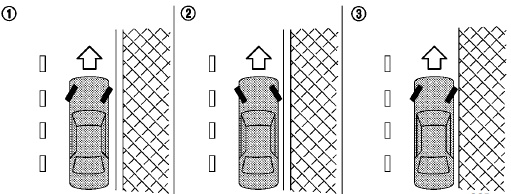
3. To help prevent the vehicle from rolling into
traffic when parked on an incline, it is a good
practice to turn the wheels as illustrated.
• HEADED DOWNHILL WITH CURB:1
Turn the wheels into the curb and move
the vehicle forward until the curb side
wheel gently touches the curb.
• HEADED UPHILL WITH CURB:2
Turn the wheels away from the curb and
move the vehicle back until the curb side
wheel gently touches the curb.
• HEADED UPHILL OR DOWNHILL, NO
CURB:3
Turn the wheels toward the side of the
road so the vehicle will move away from
the center of the road if it moves.
4. Push the ignition switch to the LOCK position.
See also:
Seat belts with pretensioners (front seats)
WARNING
• The
pretensioners cannot be reused
after activation. They must be replaced together with the retractor
and buckle as a unit.
• If the vehicle
becomes involved in a
collision but ...
Hood
1 Pull the hood lock release handle located
below the driver side instrument panel. The
hood will spring up slightly.
2 Push the lever at the front of the hood to the
side as illustrated with yo ...
Securing the load
Cargo area luggage hooks
There are luggage hooks located in the cargo
area as shown. The hooks can be used to secure
cargo with ropes or other types of straps.
Do not apply a total load of more ...