
Intelligent Around View Monitor system limitations
Basic Information
WARNING The following conditions describe important operating limitations of the Intelligent Around View Monitor.
Failure to operate the Nissan Murano in accordance with these limitations and to observe the surrounding area directly could result in a collision, serious injury, or death.
- Do not use the Intelligent Around View Monitor while the outside mirrors are folded into their stored position. Before maneuvering the vehicle with the camera display, make sure the mirrors are fully extended and the liftgate is securely closed.
- The apparent distance between the vehicle and objects shown on the Intelligent Around View Monitor may differ from the actual distance. Never use the screen as the only means of judging clearance.
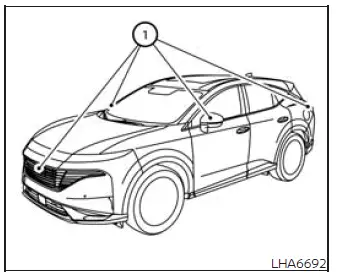
- The cameras are installed in the front grille, on the outside mirrors, and above the rear license plate. Do not attach accessories, coverings, or other objects that block any of these cameras or restrict their field of view.
- When washing the Nissan Murano with high-pressure water, do not direct the spray at or around the cameras. Pressurized water may enter a camera unit, leading to condensation on the lens, improper operation, fire, or electric shock.
- Do not strike, push, or apply force to the cameras. These components are precision instruments, and an impact may cause damage or a malfunction that could result in fire or electric shock.
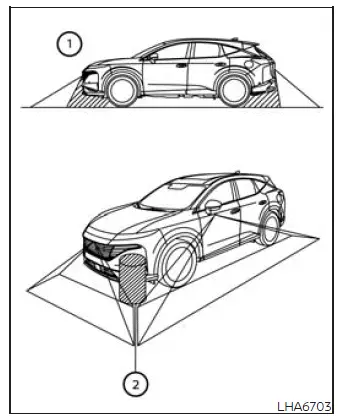
Some areas around the vehicle are outside the cameras' coverage, and the system does not provide a warning for moving objects. In the front or rear view, an object positioned below the bumper or lying close to the ground may not appear in area 1. In the bird's-eye view, a tall object located near seam 2, where images from separate cameras are combined, may be partially shown, misaligned, or completely absent from the monitor. Always check around the Nissan Murano through the windows and mirrors before and during a maneuver.
The following conditions are normal operating characteristics of the Intelligent Around View Monitor and do not necessarily indicate a system malfunction:
- A brief delay may occur when the display changes from one camera view to another.
- In extremely high or low temperatures, objects on the screen may appear unclear or difficult to distinguish.
- When strong light shines directly into a camera, the displayed image may lose clarity and some objects may be difficult to see.
- The image may flicker when the vehicle is in an area illuminated by fluorescent lighting.
- Colors shown on the Intelligent Around View Monitor may differ slightly from the actual colors of surrounding objects.
- In dark conditions, objects may appear unclear, and their displayed colors may not accurately match their actual appearance.
- Sharpness and image quality may vary between the individual camera images combined to create the bird's-eye view.
- Do not apply wax to a camera lens. If wax reaches the lens, remove it using a clean cloth dampened with a diluted mild cleaning agent, then carefully wipe the surface with a dry cloth.
System temporarily unavailable
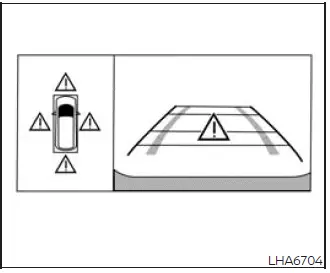
When the "!" icon appears on the screen, the Intelligent Around View Monitor has detected an abnormal operating condition. This indication does not prevent normal driving of the Nissan Murano, but some camera functions or displayed images may not operate as intended. The system should be inspected to determine the cause of the condition. It is recommended that you visit a NISSAN dealer for this service.
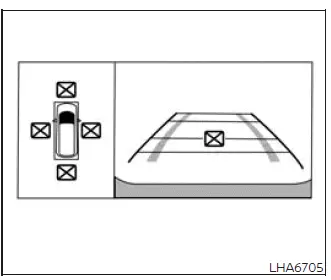
When the "[X]" icon appears on the screen, the camera image may be affected by temporary electronic interference from devices or equipment in the surrounding area. The disturbance may reduce image quality or temporarily interrupt normal camera display operation. This condition does not interfere with the normal driving operation of the vehicle, but the system should be inspected if the icon appears repeatedly or the interference occurs frequently.
It is recommended that you visit a NISSAN dealer to have the Intelligent Around View Monitor checked and serviced.
System maintenance
CAUTION
- Do not use alcohol, benzine, thinner, or similar solvents to clean a camera lens or housing. These substances may damage the surface and cause discoloration.
- Do not scratch, strike, or otherwise damage any of the cameras, because damage may reduce image quality or adversely affect the monitor display.
If dirt, water, rain residue, or snow accumulates on any camera 1, the Intelligent Around View Monitor may produce a blurred, obstructed, or unclear image, making nearby objects more difficult to identify. Clean the affected camera carefully with a soft cloth dampened with a diluted mild cleaning agent, then wipe the surface with a clean, dry cloth. Keeping the Nissan Murano camera lenses clean helps preserve a clear view of the surrounding area during parking and low-speed maneuvering.
See also:
Tire labeling
Example
Federal law requires tire manufacturers to
place standardized information on the sidewall
of all tires. This information identifies
and describes the fundamental characteristics
of the ...
Cargo floor box (if so equipped for Hardtop
models)
Type A
Type A
1. To open the cargo floor box, pull the strap
A .
2. Remove the strapB from the back side of
the board and hang it on the lip of the lift
gate.
Type B
Type B
To open the ca ...
All-Wheel Drive (AWD)
If a malfunction or abnormal operating condition is detected in the All-Wheel Drive system while the engine is
running, a corresponding warning message will appear in the meter. The message identif ...