
Basic information
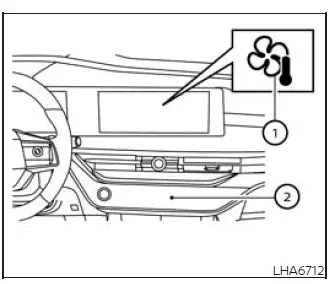
The heater and automatic air conditioner in the Nissan Murano can be operated using either the physical control panel buttons 2 or the corresponding keys displayed on the climate control screen. Both interfaces provide access to the principal temperature, airflow, fan speed, and air intake settings.
To open the climate control screen, touch the "
 " climate controls key 1 on the display
screen. The touch-screen menu will then show the available climate settings and equipped comfort functions.
" climate controls key 1 on the display
screen. The touch-screen menu will then show the available climate settings and equipped comfort functions.
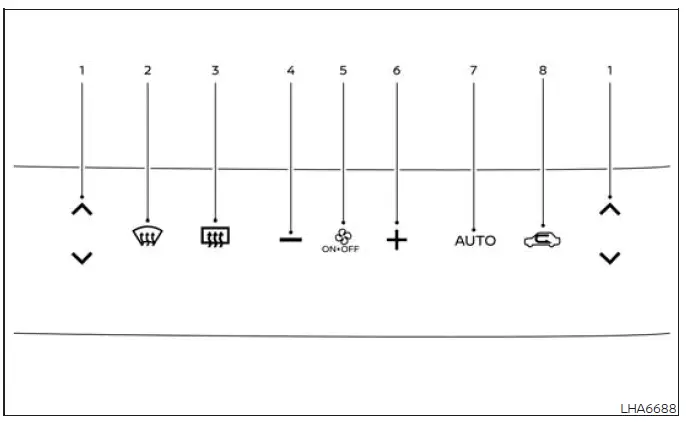
Heater and air conditioner control panel
-
 ,
,
 Temperature control buttons used to lower or raise the
selected cabin temperature.
Temperature control buttons used to lower or raise the
selected cabin temperature.
-
 Front defroster control for directing airflow toward
the windshield.
Front defroster control for directing airflow toward
the windshield.
-
 Rear window and outside mirror defroster
control.
Rear window and outside mirror defroster
control.
-
 Fan speed control decrease button.
- ON·OFF button used to switch the heater and air conditioner system on or off.
-
 Fan speed control increase button.
- AUTO button used to activate automatic climate control operation.
-
 Air intake control for selecting the available fresh-air or recirculation setting.
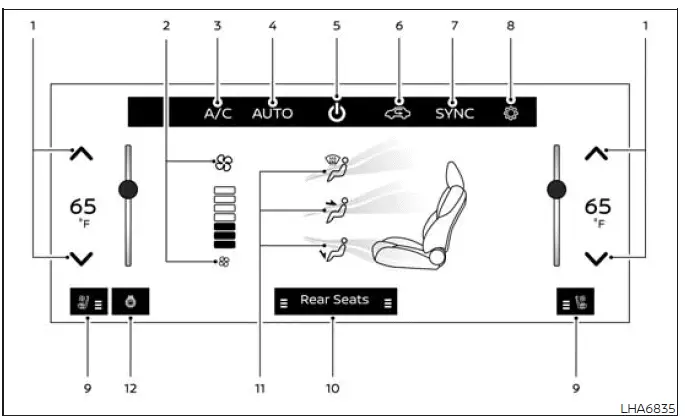
 Climate control screen
-
 ,
,
 Temperature controls used to adjust the selected cabin
temperature.
Temperature controls used to adjust the selected cabin
temperature.
- Fan speed control for selecting the desired airflow intensity.
- A/C (air conditioner) key used to control the cooling function.
- AUTO (automatic) key used to activate automatic regulation of the climate system.
-
 ON-OFF control for switching the climate system on or off.
-
 Air intake control for changing the selected air
circulation mode.
Air intake control for changing the selected air
circulation mode.
- SYNC (synchronize) key used to coordinate the applicable temperature settings.
-
 Settings key for opening additional climate-related options.
-
 Front climate controlled seats, if so equipped.
- Rear heated seat switches, if so equipped.
- Air flow control for selecting where conditioned air is directed within the passenger compartment.
-
 Heated steering wheel control, if so equipped.
WARNING
- The air conditioner cooling function operates only while the engine is running.
- Do not leave children or adults who would normally require assistance unattended inside the Nissan
Murano.
Pets must also never be left alone in the vehicle.
An unattended occupant could accidentally operate vehicle controls and injure themselves or others. In addition, temperatures inside a closed vehicle can rise rapidly on warm or sunny days, creating conditions that may cause severe or potentially fatal injury to people or animals.
- Do not leave the climate system in recirculation mode for an extended period. Prolonged use may cause the passenger-compartment air to become stale and can increase the likelihood of condensation or fog forming on the windows.
NOTE:
- Odors originating inside or outside the vehicle may collect within the air conditioner unit and later enter the passenger compartment through the vents when the system is operating.
- The heater and air conditioner system may automatically change to the fresh-air mode.
This automatic change introduces outside air and helps reduce odors that could otherwise accumulate inside the climate control unit.
See also:
How to use SETTING button
Models with navigation system
Models without navigation system
The display as illustrated will appear when the
SETTING button is pushed.
Items displayed on the screen may vary depending
on ...
How to use the NISSAN controller
Use the NISSAN controller to choose an item on
the display screen. Highlight an item on the display
using the main directional buttons 2 or the
center dial 3 . Then press the ENTER button 1
to s ...
USB interface (models without Navigation System) (if so equipped)
Connecting a device to the USB input
jack
CAUTION
● Depending on size and shape of USB
device, the console lid may not fully
close. Do not force console lid closed
as this may damage USB ...