
Speed Adjust by Route - a Feature of ProPILOT Assist with Navi-link
Basic Information
Speed Adjust by Route is part of the ProPILOT Assist systems available on vehicles equipped with a built-in Map locator system. Before using this feature in the Nissan Murano, read the complete ProPILOT Assist section, including the operating instructions, display descriptions, warnings, and system limitations.
WARNING The following limitations apply to Speed Adjust by Route. Failure to operate the vehicle in accordance with these limitations could result in serious injury or death:
- Speed Adjust by Route has operating limitations and cannot respond correctly in every situation.
The system does not function under all driving, traffic, weather, or road conditions. The driver must remain attentive, make safe driving decisions, and maintain control of the vehicle at all times.
- Speed Adjust by Route does not brake the vehicle to a complete stop.
The driver must monitor the road ahead and apply the brakes whenever additional deceleration or stopping is required.
- The driver is responsible for choosing an appropriate speed, obeying all applicable traffic laws and posted restrictions, and remaining aware of surrounding vehicles and other road users.
- Speed Adjust by Route does not operate in Hawaii or the U.S. island territories.
- Speed Adjust by Route may not function correctly under some road or traffic conditions and could adjust vehicle speed unexpectedly. The driver must be prepared to control the Nissan Murano speed manually whenever system operation does not match the current situation.
- Speed Adjust by Route does not provide speed adjustment for entrance or exit ramps.
Examples of conditions in which the feature may be unavailable or may not operate as expected include the following:
- When the Map locator system cannot connect to the server required to obtain map data.
- When the software license for the Map locator system has expired and the required map information is unavailable.
- When data supplied by the Map locator system is outdated, incomplete, or temporarily unavailable.
- When driving in a country, region, or area that is not included in the coverage of the Map locator system.
- When traveling on a road that is under construction or has been newly constructed and is not accurately represented in the available map data.
- When driving near a roadway split, complex junction, or freeway interchange where the vehicle's route may not be identified correctly.
- When severe weather or poor road conditions affect system operation or make the available route information less reliable.
When Speed Adjust by Route is active on a limited-access freeway, it uses road information supplied by the Map locator system to modify vehicle speed according to the curvature of freeway interchanges and freeway curves. The adjustment is intended to provide smoother speed control as the vehicle approaches and travels through mapped curved sections of the roadway.
The system may not provide all of the deceleration required for a particular curve or traffic situation. The driver must continue monitoring vehicle speed and road conditions and may need to apply additional braking at any time.
After the Nissan Murano passes through the identified freeway interchange or curve, the vehicle accelerates toward the previously selected set speed when operating conditions permit.
NOTE:
- Speed Adjust by Route does not operate while the accelerator pedal is being pressed. The driver directly controls acceleration while the pedal remains depressed.
- System operation may vary depending on the selected following distance and whether vehicles are detected ahead. Traffic in front of the vehicle may affect when and how speed is adjusted.
- The current Speed Adjust by Route settings remain stored in the vehicle information display after the engine is turned off and restarted.
- The Speed Adjust function becomes active whenever Steering Assist with HD map data is operating, even when Speed Adjust by Route has been disabled through the vehicle information display.
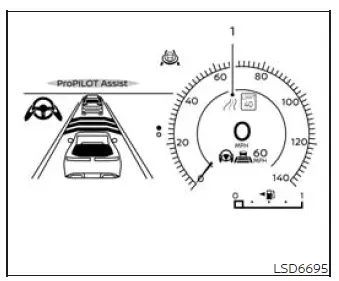
System Display and Indicators
1. Road information indicator
The road information indicator appears when the system is actively adjusting vehicle speed in response to a mapped turn. Its appearance informs the driver that Speed Adjust by Route has recognized an upcoming or current curved section and is modifying speed according to available route data.

Indicates speed adjustment for mapped freeway interchanges and freeway curves.
How to Activate or Deactivate the System:
1. Press the  button on the
steering wheel repeatedly until "Settings" appears in the vehicle information display, and then press the OK
button to open the settings menu.
button on the
steering wheel repeatedly until "Settings" appears in the vehicle information display, and then press the OK
button to open the settings menu.
2. Use the scroll dial to highlight "Driver Assistance", and then press the OK button to access the available driver assistance settings.
3. Select "Speed Adjust by Route", and press the OK button to switch the feature on or off. Confirm the selected setting in the vehicle information display before returning to the main screen.
NOTE: The system retains the currently selected setting in the vehicle information display even after the engine is restarted.
See also:
Automatic Transmission Fluid (ATF). Brake fluid. Windshield-washer fluid
Automatic Transmission Fluid (ATF)
When the automatic transmission fluid requires inspection, replacement, or other service, it is recommended that
you visit a NISSAN dealer. Correct fluid selectio ...
How to use the NISSAN controller
Use the NISSAN controller to choose an item on
the display screen. Highlight an item on the display
using the main directional buttons 2 or the
center dial 3 . Then press the ENTER button 1
to s ...
Engine block heater (if so equipped)
Engine block heaters are used to assist with
cold temperature starting.
The engine block heater should be used when
the outside temperature is 208F (−78C) or lower.
To use the engine blo ...