
Active noise cancellation
Active noise cancellation
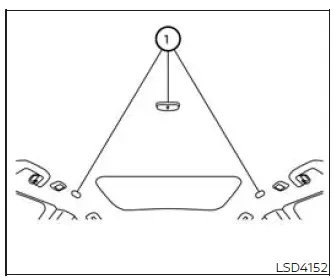
Rear Microphone
The active noise cancellation system uses microphones 1 positioned inside the Nissan Murano cabin to detect low-frequency engine booming noise. After identifying this unwanted sound, the system automatically produces a corresponding noise-canceling signal through the vehicle speakers and the woofer, if so equipped. This sound is designed to reduce the perceived engine booming noise and provide a quieter, more comfortable passenger compartment.
NOTE: To help the active noise cancellation system operate correctly, observe the following precautions:
- Do not cover or obstruct any of the speakers or the woofer, if so equipped, because the system relies on these components to produce the noise-canceling sound.
- Do not cover the interior microphones or place objects directly over them, as this may prevent accurate detection of engine booming noise.
- Do not replace, alter, or modify the speakers, including the woofer if so equipped, or any related audio component such as the amplifier. Changes to the audio system may affect active noise cancellation performance.
- Do not install additional sound-deadening materials or make other modifications around the microphones or speakers. Altering these areas may change the acoustic characteristics of the cabin and interfere with proper system operation.
Active sound enhancement
Active sound enhancement reinforces selected existing engine sounds according to engine speed and the selected driving mode. The enhanced sound is reproduced through the Nissan Murano speakers and the woofer, if so equipped, to provide a more noticeable engine sound that reflects the current driving conditions.
See also:
Heated seats (if so equipped)
WARNING
Do not use or allow occupants to use
the seat heater if you or the occupants
cannot monitor elevated seat temperatures
or have an inability to feel pain in
body parts that contact the sea ...
Hardtop models
1. Hood
2. Headlight and turn signal lights
— Switch operation
— Bulb replacement
3. Windshield wiper and washer
— Switch operation
— Rain-sensing auto wiper system
— Blade replace ...
Locking with inside lock knob
Inside lock
To lock the door without the key, move the inside
lock knob to the lock position 1 , then close the
door.
To unlock the door without the key, move the
inside lock knob to the unlo ...