
Locking with inside lock knob
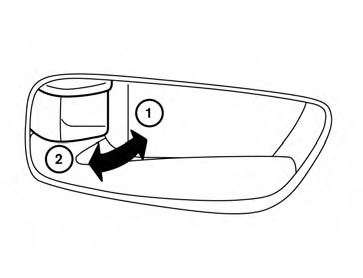
Inside lock
To lock the door without the key, move the inside lock knob to the lock position 1 , then close the door.
To unlock the door without the key, move the inside lock knob to the unlock position 2 .
See also:
Basic information
The Idling Stop System is designed to reduce unnecessary fuel consumption, exhaust emissions, and engine noise
while the Nissan Murano is temporarily stationary.
When the vehicle comes to a s ...
Small children
Children that are over 1 year old and weigh at
least 20 lbs (9 kg) should remain in a rear-facing
child restraint as long as possible up to the height
or weight limit of the child restraint. Childr ...
OFF button
To change the display brightness, press
the OFF button. Pressing the button
again
will change the display to the day
or the
night display. The brightness can
then be
adjusted using the NI ...