
Intelligent Key battery replacement
Basic information
WARNING
- Ingestion hazard: Swallowing the battery can cause serious injury or death.
- A swallowed button-cell or coin battery can cause severe internal chemical burns in as little as 2 hours.
- Keep both new and used batteries securely out of the reach of children.
- Do not allow children or pets to handle or swallow the battery or any parts removed from the Intelligent Key.
- Seek immediate medical attention if you suspect that a battery has been swallowed or inserted into any part of the body. Do not wait for symptoms to appear.
- For treatment information, call the National Battery Ingestion Hotline at 1-800-498-8666.
- An incorrectly installed replacement battery may explode. Use only the same battery type or an equivalent replacement, and install it in the correct orientation. Improper replacement can result in serious injury or death.
- Do not crush, cut, puncture, or otherwise damage the battery.
- Do not expose the battery to extremely low air pressure at high altitude.
- Do not expose the battery to excessive heat, including direct sunlight, fire, or similar heat sources.
CAUTION
- Improper battery disposal can harm the environment. Follow all applicable local regulations for collecting, recycling, or disposing of used batteries.
- When replacing the battery, prevent dust, oil, moisture, or other contamination from reaching the Intelligent Key components.
NISSAN Intelligent Key
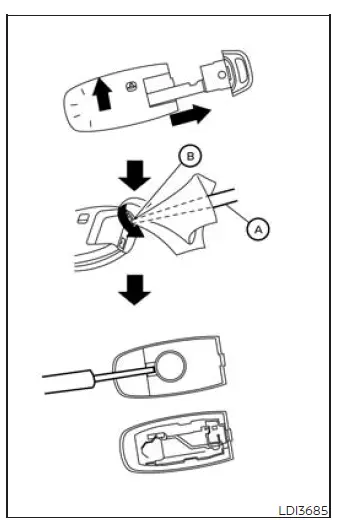
Replace the battery in the Nissan Murano Intelligent Key by following the procedure below:
1. Remove the mechanical key from the Intelligent Key before opening the housing.
2. Insert small flathead screwdriver A into corner slit B, then carefully twist the screwdriver to separate the upper section of the housing from the lower section. Cover the screwdriver tip with a cloth to help protect the Intelligent Key casing from scratches or other surface damage.
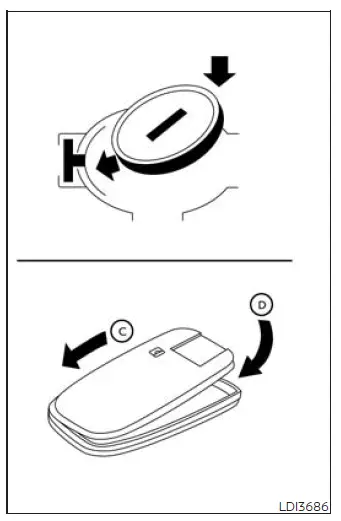
3. Remove the old battery and install a new one of the specified type.
Recommended battery: CR2032 or equivalent.
- Do not touch the internal circuit board or electrical terminals. Contact with these components may cause the Intelligent Key to malfunction.
- Hold the replacement battery only by its edges. Gripping it across the contact surfaces can reduce its available storage capacity.
- Install the battery so the + side faces the bottom of the lower housing section, as illustrated.
4. Align the upper and lower sections of the Intelligent Key housing, then close the lid securely in the sequence illustrated by C and D. Make sure the casing is fully joined around its edges.
5. Operate each button to confirm that the Intelligent Key functions correctly with the Nissan Murano after the battery has been replaced.
If you require assistance with battery replacement or the Intelligent Key does not operate correctly afterward, it is recommended that you visit a NISSAN dealer for service.
FCC Notice:
For USA:
This device complies with Part 15 of the FCC Rules. Operation is subject to the following two conditions: (1) This device may not cause harmful interference, and
(2) this device must accept any interference received, including interference that may cause undesired operation.
Note:
Changes or modifications not expressly approved by the party responsible for compliance could void the user's authority to operate the equipment.
For Canada:
This device contains licence-exempt transmitter(s)/receiver(s) that comply with Innovation, Science and Economic Development Canada's licence-exempt RSS(s). Operation is subject to the following two conditions: (1) This device may not cause interference. (2) This device must accept any interference, including interference that may cause undesired operation of the device.
See also:
Phone settings
Call
• (a name)
If there are entries stored in the Phone Book,
a number associated with a name and
location can be dialed. See “Phone book
registration” in this section to learn how to
s ...
Types of tires
Basic information
WARNING
When changing or replacing tires, make sure all four tires are of the same type, such as Summer, All
Season, or Snow, and that they have matching construction. A ...
Settings
Basic Information
The setting mode allows you to adjust the
information shown in the vehicle information
display and personalize how several vehicle functions are presented or controlled. In t ...