
Rear-facing child restraint installation using LATCH
Refer to all Warnings and Cautions in the “Child safety” and “Child restraints” sections before installing a child restraint.
Follow these steps to install a rear-facing child restraint using the LATCH system:
1. Position the child restraint on the seat.
Always follow the child restraint manufacturer’s instructions.
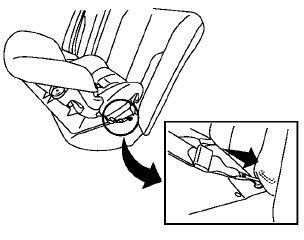
Rear-facing web-mounted — step 2
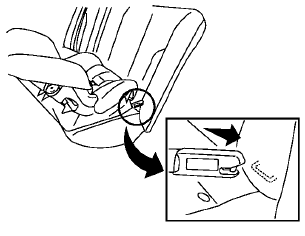
Rear-facing rigid-mounted — step 2
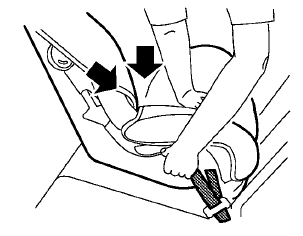
Rear-facing — step 3
2. Secure the child restraint anchor attachments
to the LATCH lower anchors. Check
to make sure the LATCH attachment is
properly attached to the lower anchors.
3. For child restraints that are equipped with
webbing-mounted attachments, remove any
additional slack from the anchor attachments.
Press downward and rearward firmly in the center of the child restraint with your hand to compress the vehicle seat cushion and seatback while tightening the webbing of the anchor attachments.
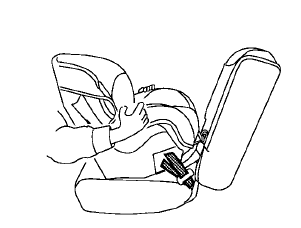
Rear-facing — step 4
4. After attaching the child restraint, test it
before you place the child in it. Push it from
side to side while holding the child restraint
near the LATCH attachment path. The child
restraint should not move more than 1 inch
(25 mm), from side to side. Try to tug it
forward and check to see if the LATCH
attachment holds the restraint in place. If the
restraint is not secure, tighten the LATCH
attachment as necessary, or put the restraint
in another seat and test it again. You may
need to try a different child restraint or try
installing by using the vehicle seat belt (if
applicable). Not all child restraints fit in all
types of vehicles.
5. Check to make sure the child restraint is
properly secured prior to each use. If the
child restraint is loose, repeat steps 1
through 4.
See also:
Engine compartment
CAUTION
Never use a fuse of a higher or lower
amperage rating than that specified on
the fuse box cover. This could damage
the electrical system or cause a fire.
If any electrical equipment doe ...
Sunglasses holder (Hardtop models)
WARNING
Keep the sunglasses holder closed
while driving to prevent an accident.
To open the sunglasses holder, push1 .
CAUTION
• Do not use
for anything other than
glasses.
• Do not lea ...
Seat belts with pretensioners (front seats)
WARNING
• The
pretensioners cannot be reused
after activation. They must be replaced together with the retractor
and buckle as a unit.
• If the vehicle
becomes involved in a
collision but ...