
Power outlet
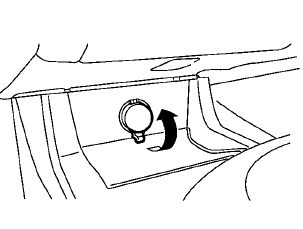
Center console
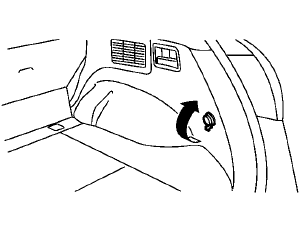
Cargo area (Hardtop models)
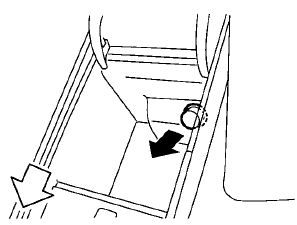
Console box — Type A
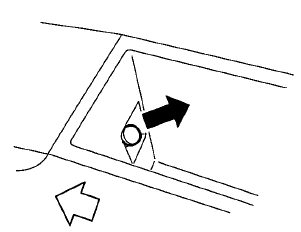
Console box — Type B
To use the power outlet, pull the cover as illustrated.
CAUTION
• The outlet
and plug may be hot
during or immediately after use.
• Do not use with
accessories that
exceed a 12 volt, 120W (10A) power
draw. Do not use double adapters or
more than one electrical accessory.
• Use power outlet
with the engine
running to avoid discharging the
vehicle battery.
• Avoid using
power outlet when the
air conditioner, headlights or rear
window defroster is on.
• This power
outlet is not designed
for use with a cigarette lighter unit.
• Push the plug in
as far as it will go. If good contact is not made, the
plug
may overheat or the internal temperature
fuse may open.
• Before inserting
or disconnecting a
plug, be sure the electrical accessory
being used is turned OFF.
• When not
in use, be sure to close
the cap. Do not allow water or any
liquid to contact the outlet.
See also:
Operational indicators
1. Engine start operation indicator
This indicator appears when the shift lever is in
the P (Park) position.
This indicator means that the engine will start by
pushing the ignition switch with ...
Rapid air pressure loss
Rapid air pressure loss or a “blow-out” can occur
if the tire is punctured or is damaged due to
hitting a curb or pothole. Rapid air pressure loss
can also be caused by driving on under-inflate ...
Vehicle loading information
WARNING
● It is extremely dangerous to ride
in a cargo area inside a vehicle. In
a collision, people riding in these
areas are more likely to be seriously
injured or killed.
● Do not ...