
Lift gate

- Always be sure the lift gate has been closed securely to prevent it from opening while driving.
- Do not drive with the lift gate open.
This could allow dangerous exhaust gases to be drawn into the vehicle.
See “Exhaust gas (carbon monoxide)” in the “5. Starting and driving” section of this manual.
- Make sure that all passengers have their hands, etc. inside the vehicle before closing the lift gate.
Lift gate
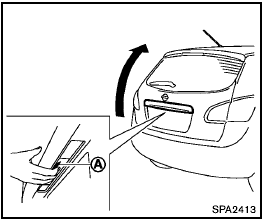
To open the lift gate, unlock it and push the opener switch A . Pull up the lift gate to open.
The lift gate can be unlocked by:
- pushing the unlock button  on the
keyfob or the Intelligent Key (if so equipped) twice.
on the
keyfob or the Intelligent Key (if so equipped) twice.
- pushing the lift gate request switch (if so equipped).
- pushing the power door lock switch to the unlock position.
- inserting the key into the driver’s door key cylinder and turning it to the rear of the vehicle twice.
To close the lift gate, pull down until it securely locks.
Lift gate release
Lift gate release
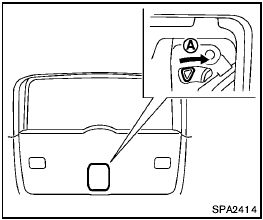
If the lift gate cannot be opened due to a discharged battery, follow these steps.
1. Remove the cover inside of the lift gate with a suitable tool.
2. Move the lever toward the direction A as illustrated to open the lift gate.
Have the vehicle checked by a NISSAN dealer.
See also:
Air fresheners
Most air fresheners use a solvent that could
affect the vehicle interior. If you use an air
freshener, take the following precautions:
• Hanging-type air fresheners can
cause
permanent discolo ...
Air bags, seat belts and child restraints. Exterior front. Exterior rear
Air bags, seat belts and child restraints
Roof-mounted curtain side-impact and rollover supplemental air bags, positioned along the upper side areas
of the cabin to help provide addi ...
Cleaning exterior
Basic information
Proper exterior care is essential for preserving the finish and overall appearance of your Nissan Murano. Regular
cleaning helps prevent dirt, environmental residue, and other c ...