
Front power seat adjustment (if so equipped)
Operating tips
● The power seat motor has an auto-reset
overload protection circuit. If the motor
stops during operation, wait 30 seconds,
then reactivate the switch.
● Do not operate the power seat switch for a
long period of time when the engine is off.
This will discharge the battery.
See “Automatic drive positioner” in “Pre-driving checks and adjustments” for automatic drive positioner operation.
Forward and backward
Moving the switch forward or backward will slide the seat forward or backward to the desired position.
Reclining
Move the recline switch backward until the desired angle is obtained. To bring the seatback forward again, move the switch forward and move your body forward. The seatback will move forward.
The reclining feature allows adjustment of the seatback for occupants of different sizes for added comfort and to help obtain proper seat belt fit. See “Precautions on seat belt usage” later in this section. Also, the seatback can be reclined to allow occupants to rest when the vehicle is stopped and the shift selector is in P (Park).
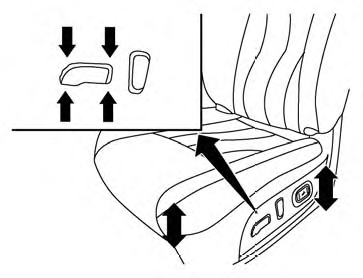
Seat lifter (driver’s seat)
Push the front or rear end of the switch up or down to adjust the angle and height of the seat cushion.
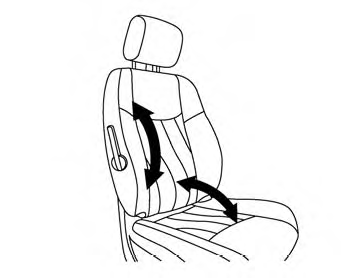
Manual (if so equipped)
Lumbar support (driver’s seat)
The lumbar support feature provides lower back support to the driver. Move the lever up or down (manual) or push the front or back end of the switch (power) to adjust the seat lumbar area.
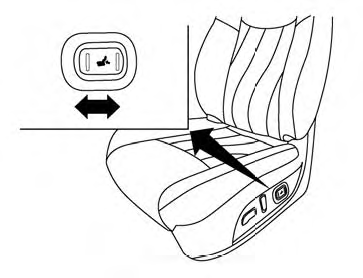
Power (if so equipped)
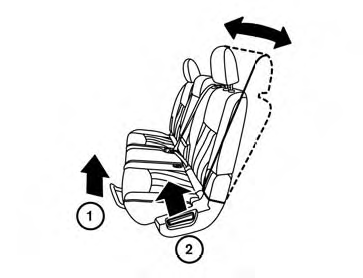
Outboard seats
See also:
If your vehicle is stolen
If your vehicle is stolen, you should change the
codes of any non-rolling code device that has
been programmed into HomeLink®. Consult the
Owner’s Manual of each device or call the
manufacturer ...
Hood
1 Pull the hood lock release handle located
below the driver side instrument panel. The
hood will spring up slightly.
2 Push the lever at the front of the hood to the
side as illustrated with yo ...
Basic Information. Operating range
Basic Information
WARNING Never operate the push-button ignition switch while the vehicle is moving unless an
emergency makes it necessary. The engine will stop if the ignition switch is presse ...