
HomeLink® universal transceiver (Type B) (if so equipped)
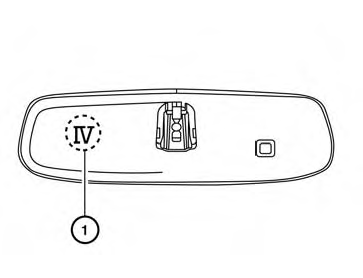
The Type B system can be identified by the IV 1 on the back of the mirror. Move the mirror to see if the IV is present. If the IV is on the mirror, use the procedure in this section to program the HomeLink® Universal Transceiver . Otherwise, use the procedure in “HomeLink® universal transceiver (Type A) (if so equipped)”.
The HomeLink® Universal Transceiver provides a convenient way to consolidate the functions of up to three individual hand-held transmitters into one built-in device.
HomeLink® Universal Transceiver:
● Will operate most Radio Frequency (RF)
devices such as garage doors, gates, home
and office lighting, entry door locks and security
systems.
● Is powered by your vehicle’s battery. No
separate batteries are required. If the vehicle’s
battery is discharged or is disconnected,
HomeLink® will retain all programming.
Once the HomeLink® Universal Transceiver is programmed, retain the original transmitter for future programming procedures (Example: new vehicle purchases).
Upon sale of the vehicle, the programmed HomeLink® Universal Transceiver buttons should be erased for security purposes. For additional information, refer to “Programming HomeLink®” later in this section.
WARNING
● Do not use the HomeLink® Universal
Transceiver with any garage door
opener that lacks safety stop and reverse
features as required by federal
safety standards. (These standards became
effective for opener models
manufactured after April 1, 1982). A garage
door opener which cannot detect
an object in the path of a closing garage
door and then automatically stop and
reverse, does not meet current federal
safety standards. Using a garage door
opener without these features increases
the risk of serious injury or
death.
● During the programming procedure
your garage door or security gate will
open and close (if the transmitter is
within range). Make sure that people or
objects are clear of the garage door,
gate, etc. that you are programming.
● Your vehicle’s engine should be turned
off while programming the HomeLink®
Universal Transceiver.
- Programming HomeLink®
- Programming HomeLink® for Canadian customers and gate openers
- Operating the HomeLink® universal transceiver
- Programming trouble-diagnosis
- Clearing the programmed information
- Reprogramming a single HomeLink® button
- If your vehicle is stolen
See also:
Indicator lights
All-Wheel Drive (AWD) LOCK
indicator light (AWD models)
This light illuminates when the ignition switch is
placed in the ON position, and turns off within 1
second.
When selecting the LOCK mode ...
Compass display (if so equipped)
This unit measures terrestrial magnetism and indicates
the heading direction of the vehicle.
With the ignition switch in the ON position, press
the or
button as described in the
charts below ...
Tire Pressure Monitoring System (TPMS)
Each tire, including the spare (if provided),
should be checked monthly when cold and
inflated to the inflation pressure recommended
by the vehicle manufacturer on the vehicle
placard or tire infl ...