
How to park with predictive course lines
WARNING
• Always turn and check that it is
safe
to do so before backing up. Always
back up slowly.
• Use the displayed lines as a reference.
The lines are highly affected
by the number of occupants, fuel
level, vehicle position, road condition
and road grade.
• If the tires are replaced with
different
sized tires, the predictive course
line may be displayed incorrectly.
• On a snow-covered or slippery road,
there may be a difference between
the predictive course line and the
actual course line.
• The displayed lines will appear
slightly off to the right because the
RearView camera is not installed in
the rear center of the vehicle.
• The distance guide line and the
vehicle width line should be used
as a reference only when the vehicle
is on a level paved surface. The
distance viewed on the monitor is
for reference only and may be
different than the actual distance
between the vehicle and displayed
objects.
• When backing-up the vehicle up a
hill objects viewed in the monitor
are further than they appear. When
backing-up the vehicle down a hill,
objects viewed in the monitor are
closer than they appear. Use the
inside mirror or glance over your
shoulder to properly judge distances
to other objects.
The vehicle width and predictive course lines are wider than the actual width and course.
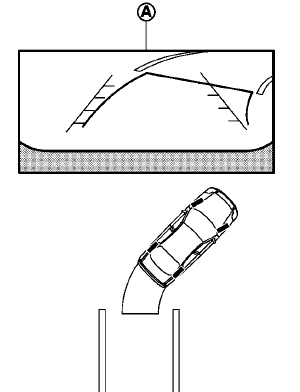
1. Visually check that the parking space is safe
before parking your vehicle.
2. The rear view of the vehicle is displayed on
the screen A when the shift lever is moved
to the R (Reverse) position.
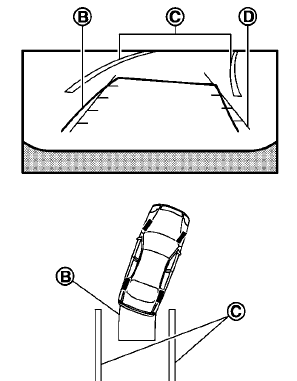
3. Slowly back up the vehicle adjusting the
steering wheel so that the predictive course
lines B enter the parking space C .
4. Maneuver the steering wheel to make the
vehicle width guide lines D parallel to the
parking space C while referring to the
predictive course lines.
5. When the vehicle is parked in the space
completely, move the shift lever to the P
(Park) position and apply the parking brake.
See also:
Passenger compartment
CAUTION
Never use a fuse of a higher or lower
amperage rating than that specified on
the fuse box cover. This could damage
the electrical system or cause a fire.
If any electrical equipment doe ...
NISSAN Intelligent Key®
WARNING
● Radio waves could adversely affect
electric medical equipment. Those who
use a pacemaker should contact the
electric medical equipment manufacturer
for the possible influences bef ...