
Drive Mode Selector
Basic information
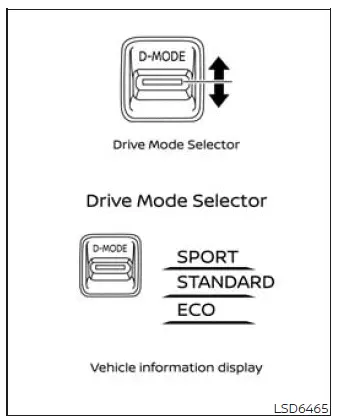
Drive Mode
Selector
The Drive Mode Selector allows the driver to choose among three available driving modes: SPORT, STANDARD, and ECO. Each mode adjusts selected vehicle operating characteristics to suit different driving conditions and preferences.
To change the driving mode, push the Drive Mode Selector upward or downward until the desired mode is highlighted and selected.
NOTE: After a mode is selected with the Drive Mode Selector, the change may not occur immediately.
A brief delay while the Nissan Murano applies the selected settings is normal and does not indicate a malfunction.
The currently active mode is shown in the vehicle information display. When the Drive Mode Selector is operated, a list of available modes appears, allowing the driver to review and select the preferred setting.
NOTE:
- The driving mode list will disappear automatically a few seconds after a mode has been selected.
- The displayed message or mode list can also be cleared by pressing the scroll dial on the steering-wheel-mounted controls.
If the driving mode cannot be changed with the Drive Mode Selector while the ignition switch is in the ON position, the system may require inspection. NISSAN recommends visiting a NISSAN dealer for diagnosis and service.
NOTE: STANDARD MODE is selected automatically each time the ignition switch is placed in the ON position, regardless of the mode used during the previous trip.
WARNING
- Do not look continuously at the Drive Mode Selector or the vehicle information display while driving. Keep your attention on the road, surrounding traffic, and safe operation of the Nissan Murano.
- Avoid sudden acceleration, abrupt steering inputs, and hard braking, especially on wet, icy, snowy, or otherwise slippery roads. Aggressive operation may cause tire slip, skidding, or excessive body movement, increasing the risk of losing control and having an accident.
STANDARD MODE
STANDARD MODE provides balanced vehicle response and is the most suitable setting for normal everyday driving. It is intended for typical road, traffic, and operating conditions.
SPORT mode
- Adjusts engine response and transmission shift points to provide quicker, more responsive acceleration.
- Modifies the steering system setting to moderately increase steering-wheel effort, giving the driver a more direct and sporty steering feel.
NOTE: Fuel economy may be reduced while SPORT mode is selected because the Nissan Murano responds more aggressively to accelerator input and may maintain performance-oriented operating settings.
ECO mode
Basic information
ECO mode supports more economical driving by adjusting engine operating characteristics for improved fuel efficiency. It encourages smoother starts, more gradual acceleration, and steady cruising where road and traffic conditions allow.
NOTE:
- Selecting ECO mode does not guarantee improved fuel economy. Vehicle speed, traffic, road gradient, weather, cargo weight, driving style, and other operating conditions can affect the results.
- Select a mode other than ECO when stronger or more immediate acceleration is required, including under
the following conditions:
- The vehicle is carrying a heavy load of passengers, cargo, or both.
- The vehicle is climbing a steep uphill slope where stronger acceleration response is needed.
Operation
Select ECO mode with the Drive Mode Selector. The ECO indicator will illuminate to confirm that the mode is active.
When accelerator-pedal input remains within the economical driving range, the ECO drive indicator illuminates green. If the accelerator pedal is pressed beyond the economical range, the green indicator turns off to show that current acceleration demand exceeds the ECO guidance range.
The ECO drive indicator will not illuminate under any of the following conditions:
- The transmission is in R (Reverse).
- Vehicle speed is below 2 mph (3.2 km/h) or above 90 mph (144 km/h).
- The ProPILOT Assist system is operating.
ECO Customize
ECO mode can modify the operation of the air conditioning system, cruise control, and idling stop function to support reduced fuel consumption. The ECO Customize menu allows the driver to adjust these settings and choose a preferred balance between efficiency, comfort, and vehicle response.
- Cruise Control
When this setting is ON, cruise-control acceleration is less aggressive to support smoother speed changes and improved fuel efficiency.When the setting is OFF, cruise control uses its normal acceleration characteristics and may return to the selected speed more quickly.
NOTE: When vehicle speed decreases, such as when the Nissan Murano transitions from a level road to an uphill grade, ECO cruise-control settings may take longer than normal mode to return the vehicle to the previously selected speed.
- Idling Stop
When this setting is ON and the idling stop function activates, the engine may remain off longer than it would in normal mode while the air conditioning system is operating. Extending engine-off time while the vehicle is stopped can help improve fuel efficiency. - Air Conditioning
When ECO Customize air-conditioning control is set to ON, the system reduces air-conditioning performance to lower the amount of engine power used and support improved fuel economy.
Tire Pres ECO advice
The "Tire Pres ECO advice" function displays fuel-economy-related guidance in the vehicle information display when low tire pressure is detected. Maintaining appropriate tire pressure can support efficient vehicle operation. The function can be activated or deactivated through the "ECO Mode Setting" menu.
When this setting is enabled and low tire pressure is detected, the ECO Drive Report displays the message "See Tire Pressures." The driver can then select the Tire Pressures screen in the vehicle information display to review the available pressure information.
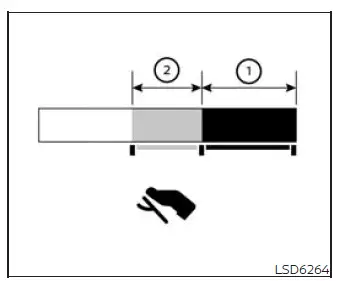
ECO pedal guide function (if so equipped)
When ECO mode is active, the ECO Pedal Guide can be selected in the vehicle information display. The guide provides visual feedback about accelerator-pedal use and can help the driver adopt smoother acceleration habits that may improve fuel economy.
When the ECO Pedal Guide bar remains within green range 1, the vehicle is being driven within the super-economy range.
When the ECO Pedal Guide bar is within light green range 2, the vehicle is being driven within the economy range.
If the ECO Pedal Guide bar moves outside green ranges 1 and 2, accelerator-pedal input is greater than the economical driving range shown by the guide.
The ECO Pedal Guide bar is not displayed under the following conditions:
- Vehicle speed is below approximately 2 mph (4 km/h).
- The transmission is in P (Park), N (Neutral), or R (Reverse).
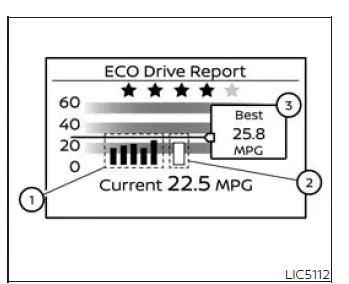
Eco Drive Report (if so equipped)
When the ignition switch is placed in the OFF position, the ECO management display appears and provides a summary of recent fuel-economy performance.
- Previous 5 times (History)
- Current fuel economy
- Best fuel economy
The ECO evaluation result becomes available after the ignition switch has been placed in the ON position for at least 30 seconds and the vehicle has been driven at least 1/3 mile (500 meters). This minimum operating period allows the system to collect sufficient driving information for the report.
- The display shows the average fuel economy recorded during the previous five driving periods.
- The average fuel economy measured since the most recent reset is displayed.
- The best fuel-economy result stored in the available driving history is displayed for comparison.
The ECO Drive Report can be switched ON or OFF through the applicable vehicle information display settings.
See also:
Remote Engine Start
Basic information
The
button is included on the NISSAN Intelligent Key when the vehicle is equipped with Remote Engine Start. This
feature allows the engine of the Nissan Muran ...
LDW system limitations
WARNING The limitations of the Lane Departure Warning system are described below. Failure to
understand these restrictions or follow the instructions for proper LDW operation could reduce the
...
Interior lights
Basic Information
The interior lights can be turned on regardless of door position. The lights will turn off after a period of
time unless the ignition switch is placed in the ON position ...