
Meters and gauges
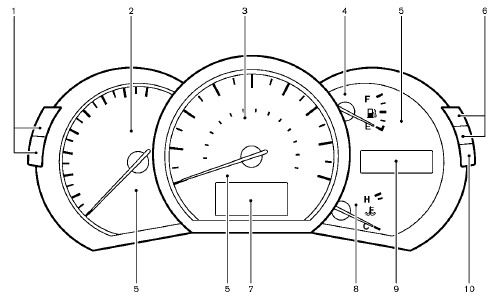
1. Instrument brightness control switch
2. Tachometer
3. Speedometer
4. Fuel gauge
5. Warning/indicator lights
6. Trip computer switch
7. Dot matrix liquid crystal display
— Trip computer
8. Engine coolant temperature gauge
9. Odometer/twin trip odometer/Continuously Variable
Transmission (CVT) position indicator
10. RESET switch for trip odometer
The needle indicators may move slightly after the ignition switch is pushed to the LOCK position. This is not a malfunction.
CAUTION
• For cleaning, use a soft cloth, dampened with water. Never use a rough cloth, alcohol, benzine, thinner or any kind of solvent or paper towel with a chemical cleaning agent.
They will scratch or cause discoloration
to the lens.
• Do not spray any
liquid such as
water on the meter lens. Spraying
liquid may cause the system to
malfunction.
See also:
CrossCabriolet models
1. Dual pop-up roll bar system
2. Seat belts
3. Head restraints
— Front-seat Active Head Restraints
4. Door-mounted curtain side-impact and rollover
supplemental air bags
5. Supplemental f ...
Rear window wiper and washer switch (Hardtop
models)
WARNING
In freezing temperatures the washer
solution may freeze on the rear window
glass and obscure your vision. Warm
the rear window with the defroster
before you wash the rear window.
CAUTION ...
Environmental factors influence the rate of corrosion
Moisture
Accumulation of sand, dirt and water on the vehicle
body underside can accelerate corrosion.
Wet floor coverings will not dry completely inside
the vehicle and should be removed for dry ...